


Nobody tells you this when you're switching your POS, your inventory system, or even your receipt printer: the software rarely fails you. The rollout fails you. And when the rollout fails, it fails during business hours, in front of customers, while the one person who understood the old workflow is out sick.
Bigger retailers absorb this. They have a training week, a backup register, an IT person who takes the call. You have yourself, maybe a part-timer, and a Saturday rush that doesn't care that your new catalog software is "still syncing." When a three-person store bungles a system change, sales drop that same afternoon — not next quarter.
So this isn't a post about picking the right software. It's about the messy middle: how you go from "we bought the thing" to "the thing works and nobody quit or lost a sale." A real bookstore change management playbook that fits on a clipboard and respects the fact that your team is basically you.
Why system changes hurt small stores more than big ones
The instinct is to assume a smaller store means a simpler change. Fewer people to train, fewer registers, less complexity. In practice it's the opposite, and the reason is concentration of knowledge.
In a store with 40 employees, the workflow lives in documentation, in a few power users, in habits spread across shifts. If one person fumbles the new returns process, four others quietly cover. In a two-person store, the entire operational memory sits in one or two heads. Change the system and you're not adjusting a habit — you're overwriting the only copy of how the store runs.
The second problem is that small stores can't easily separate "learning the new thing" from "serving customers." A regional chain trains staff off the floor. You're learning the new inventory lookup while a customer waits at the counter asking if you have the new Murakami in stock. Every hesitation is visible. Every mistake is a live one.
And third — cash flow. A big retailer eats a rough rollout week as a rounding error. For an indie doing roughly $18k–$25k a month, a genuinely disrupted week during a busy season can knock out a meaningful chunk of the month's margin. That's not a learning curve. That's rent.
The whole game is designing changes that never put you in the position of learning live, under pressure, with no fallback.
The core idea: change in small, reversible waves
The mistake almost every small store makes is the "big bang." You pick a Sunday, close early, migrate everything, and open Monday hoping it all works. It never fully does. And because you switched everything at once, you can't tell what broke — the printer mapping, the tax rule, the discount codes, or the staff not knowing where the search bar moved.
The better model is boring on purpose: pilot small, measure, expand in waves, and keep a rollback path open the entire time. Every change should have three things nailed down before it touches the sales floor:
-
A clear hypothesis (what should get better, and by how much)
-
A measurement window (how long you'll watch before deciding)
-
A rollback trigger (the specific condition that sends you back to the old way, no debate)
That third one is what small teams skip, and it's the most important. When you're exhausted mid-rollout, you don't want to be deciding whether to bail. You want to have already decided, in writing, what "this is going badly" looks like.
When you're exhausted mid-rollout, you don't want to be deciding whether to bail. You want to have already decided, in writing, what "this is going badly" looks like.
The pilot template: test before you commit
Before any system change touches your whole operation, run it on a slice. A pilot for a bookstore doesn't need to be fancy — it needs a hypothesis and a couple of metrics you'll actually track.
Pilot name: New used-book intake screen Hypothesis: The new intake screen will cut time-per-book from ~90 seconds to under 60, without increasing pricing errors. Scope: Used books only, one staff member, two weeks. Primary metric: Average seconds per book logged (sample 20 books/day). Guardrail metric: Mispriced or misgraded items caught at review (should not rise above current baseline). Rollback trigger: If pricing errors climb, or if intake time is worse after five days of practice, revert.
Notice the guardrail. A change that makes one thing faster while quietly breaking another is the most common trap. You speed up intake but start mislabeling conditions, and now you're eating returns three weeks later. The guardrail metric exists to catch the damage the primary metric can't see.
| Change being piloted | Hypothesis | Primary metric | Guardrail metric | Rollback trigger |
|---|---|---|---|---|
| New POS checkout flow | Faster checkout, fewer voids | Avg. transaction time | Void/error rate | Errors up 2 days straight |
| Marketplace sync tool | Fewer oversells | Oversell incidents/week | Time spent on reconciliation | Oversells not reduced in 10 days |
| Loyalty signup at register | More signups without slowing line | Signups per 100 sales | Checkout time | Line complaints or checkout +20s |
The pilot isn't about being scientific for its own sake. It's about knowing, before you roll wide, whether the thing actually helps — and having permission to walk away cheaply if it doesn't.
Here's a quick visual of the pilot-to-wave decision flow to keep on your clipboard.
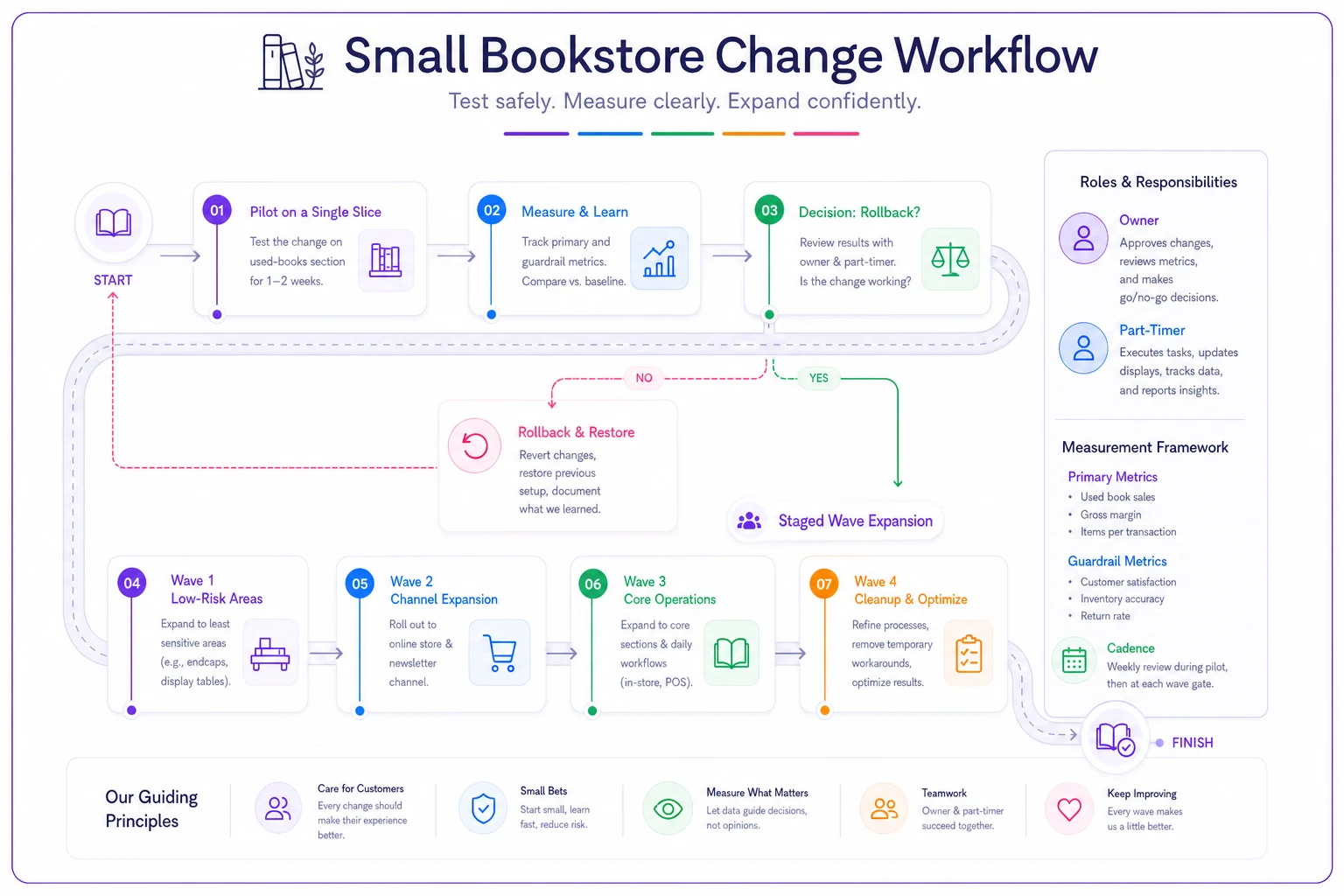
Keep this diagram near your checkout checklist so everyone knows the steps: pilot, measure, decide, expand, repeat.
Micro-training that fits a store with no spare hours
You don't have a training budget or a training day. So training has to be scripted, short, and repeatable. Two formats cover almost everything: a two-hour deep session for the person who owns the new system, and a 20-minute micro-script for anyone who just needs to survive their shift on it.
The two-hour session (for the system owner)
This is for whoever will be the go-to when things break. Structure it like this:
-
First 20 minutes — the "why." What problem this replaces, what the old pain was. People retain workflows better when they understand what they're escaping.
-
Next 40 minutes — walk the happy path. Do the five most common tasks live: a sale, a return, an inventory lookup, a special order, an end-of-day close. No edge cases yet.
-
Next 30 minutes — break it on purpose. Run the three things most likely to go wrong: a failed card, a missing barcode, a sync error. Practice the recovery, not just the ideal.
-
Final 30 minutes — write the cheat sheet together. The trainee writes the one-page reference in their own words. This becomes the 20-minute script for everyone else.
The 20-minute micro-script (for part-timers and floor staff)
Nobody who works two shifts a week needs to understand your system architecture. They need to not freeze at the register. A tight script:
-
Minutes 0–5 Ring up a normal sale. Do it twice.
-
Minutes 5–10 Process a return and a discount.
-
Minutes 10–15 Look up whether a title is in stock. Handle "we don't have it — here's how to special-order."
-
Minutes 15–20 The panic card. "If the screen freezes, the card won't run, or you're stuck — here's the one number to text and here's what you tell the customer."
That last five minutes matters more than the first fifteen.
That last five minutes matters more than the first fifteen. A part-timer who knows exactly what to do when things go sideways keeps the line moving. One who doesn't stalls the whole floor. If you already run structured shift plans, this slots right into existing routines — the same thinking behind good weekly shift templates for small bookstores applies directly to training blocks.
Rollout waves: never switch everything at once
Once the pilot clears, you expand — but in deliberate waves, not all at once. For a small store, waves are usually organized by category or channel, not department.
A sensible wave order for a new inventory system:
-
Wave 1 — Low-risk, low-volume category. Used books, or a slow section. If it breaks, few customers notice.
-
Wave 2 — A single sales channel. Get in-store working solid before you touch marketplace sync. Layering channel changes on top of an unstable base is how oversells happen. The order-routing logic behind your channels — the kind covered in the retail automation blueprint — should be stable before you add a new sync layer.
-
Wave 3 — Core high-volume categories and full POS. By now the workflow is proven and the cheat sheets are battle-tested.
-
Wave 4 — Everything else and cleanup. Special orders, consignment, edge cases.
Between each wave, you pause. You don't move forward until the current wave has run clean through at least one full busy day — a Saturday, an event night, whatever your peak looks like. A system that works on a quiet Tuesday tells you almost nothing.
The pattern that keeps showing up: stores get impatient after Wave 1 goes smoothly and jump straight to full switchover. Then a busy weekend exposes three problems at once and nobody can tell which wave caused what. The pause between waves isn't excessive caution — it's how you keep problems isolated and diagnosable.
Measurement windows and the discipline of waiting
A measurement window is just the agreed period you'll watch a change before judging it. Small stores get this wrong in both directions: some judge too fast (day one felt clunky, revert everything), others never actually decide and just live in permanent half-migration limbo.
Reasonable windows for common changes:
-
Checkout/POS changes 5–7 days. Muscle memory forms fast; if it's still slow after a week, it's the system, not the learning curve.
-
Inventory/catalog changes 2–3 weeks. Accuracy problems take time to surface as returns and stockouts.
-
Customer-facing changes (loyalty, receipts) 3–4 weeks, because you need enough transactions to see a real signup or repeat-rate signal.
Write the window down before you start, and don't renegotiate it mid-stream when you're tired. Day-three frustration is not data. Day-seven pattern is.
Rollback triggers: deciding to quit before you're exhausted
This is the part small stores need most and use least. A rollback trigger is a pre-written condition that, if hit, means you revert — no meeting, no debate.
Good triggers are specific and observable:
-
Checkout errors on two consecutive days above your normal baseline
-
Any single day where a system failure caused a lost or abandoned sale
-
Oversells not measurably reduced after the full measurement window
-
Staff can't complete a core task unassisted after the training window
The reason to pre-commit is honestly emotional. Once you've spent money and hours on a change, sunk-cost bias makes you push through problems you should walk away from. The trigger you wrote calmly, before the stress, protects you from the decisions you'd make badly in the moment.
Keep the old system reachable during the measurement window. If you migrated off the old POS, don't wipe it until the new one has cleared its window on a peak day. Rollback is only real if the door back is still open.
Communication scripts for tiny teams
When it's just you and a helper, "internal comms" sounds absurd. But even a two-person team needs alignment, and customers need reassurance when something visibly changes at the register.
> "Tomorrow we're switching to the new returns screen for used books only. Everything else stays the same. If you get stuck, text me — don't guess in front of the customer, just say 'let me grab the exact total' and message me. We're watching this for one week."
> "We just upgraded our system this week — thanks for your patience if I'm a touch slower. Actually working better on our end already."
Customers are remarkably forgiving when you name the change and stay calm. What breaks trust isn't the slowdown — it's the visible panic, the "ugh, this new thing," the muttering at the screen. Name it, own it, keep moving.
A real scenario: the two-person shop that stopped fearing switchovers
A used-and-new bookstore run by an owner and one part-timer had been putting off replacing their creaky POS for over a year — purely out of fear. Their last software change had cost them a chaotic weekend and a stack of mis-rung sales.
This time they ran it in waves. Pilot first: used-book checkout only, one register, the owner running it for two weeks. Time per sale dropped from around 75 seconds to under 50 once she got the flow down. Guardrail held — no rise in errors. Then Wave 2, in-store new books. Then, only after a clean Saturday, they added the marketplace sync.
The whole migration stretched across about five weeks instead of one weekend. Slower, yes. But there was no lost-sales day, the part-timer was comfortable within one 20-minute session per wave, and the scariest part — the marketplace sync — felt almost boring by the time they got to it, because everything under it was already solid.
Their oversell incidents, which had been running a handful a month, dropped to near zero once the sync layer went live on a stable base. Not because the software was magic, but because they didn't stack an unstable change on another unstable change.
When this playbook makes sense — and when it doesn't
When it's worth the full waved approach: any change that touches checkout, inventory accuracy, or a sales channel. Anything where a bad day costs real revenue. Anything you'd struggle to undo quickly.
When it's overkill: cosmetic changes, a new receipt design, reorganizing a back-office spreadsheet. Don't run a four-week measurement window on your label printer font. Match the ceremony to the risk.
Who should NOT do a big change right now: if you're heading into peak season — holiday rush, a major local event, back-to-school for school and library orders — freeze systems. The worst time to learn a new POS is the week you can least afford a slow line. Change in the slow season, always. A February switchover has room to breathe; a December one does not.
How this connects to the rest of your operation
System changes don't happen in isolation, and that's exactly why they're dangerous. A new inventory tool affects your reordering rhythm. A new POS touches your loyalty program and your repeat-customer flow. Change one node and you ripple into three others.
This is why pilot guardrail metrics often live in a completely different part of the business than the change itself. You update checkout — but you watch your customer signup rate, because the two are quietly linked. If your store leans on repeat buyers and subscriptions, a checkout change that adds friction can quietly dent repeat revenue before you'd ever notice from the till. The mechanics of that repeat-customer engine — the recurring-revenue and lifecycle work — are exactly what a careless rollout can damage without leaving obvious footprints.
The same goes for customer touchpoints. If a system change alters how receipts, follow-ups, or first-purchase triggers fire, you're touching the machinery behind your customer lifecycle operations. Map those connections before you flip the switch, so your guardrail metrics are actually watching the right things.
Where good operational software earns its keep isn't the flashy features — it's that a well-built platform lets you stage changes, keep the old flow reachable, and pull reports that show whether checkout time or error rates actually moved. When your system and your metrics live in one place, running a waved rollout stops being a spreadsheet-juggling nightmare and becomes something you can manage on a Tuesday afternoon between customers.
The takeaway for a store where you *are* the operation
Big-store change advice doesn't translate for you because it assumes slack — spare people, spare registers, a training week. You have none of that. So you compensate with sequencing: small pilots, honest hypotheses, waves organized by risk, measurement windows you commit to in advance, and rollback triggers you write while calm.
None of this is glamorous. It's the operational equivalent of moving furniture one piece at a time instead of tipping the whole room over and hoping. But it's the difference between a system upgrade that quietly makes your store better and one that costs you a weekend of sales and a part-timer who never quite trusts the new screen.
Change slowly, watch carefully, keep the door back open. For a store where you're the owner, the buyer, the trainer, and half the floor staff, that's not excessive caution — it's just how you stay open while you get better.