

Running a one-to-three person bookstore means your operational data lives in about twelve different places. Your POS spits out daily sales CSVs. Your distributor sends inventory files. Your marketplace platforms export their own order formats. Your events registration lives in a spreadsheet, maybe Eventbrite if you're fancy. Customer emails pile up in Gmail.
Every morning, someone spends the first hour copying numbers between systems, checking for oversells, updating inventory counts, and hoping nothing important got missed.
The worst part? Most bookstore owners think this manual reconciliation is just part of running a small business. They've normalized the chaos because they've never seen what a properly automated back office actually looks like.
Why bookstore automation CSV transforms matter more than you think
You download your Square POS report. You open your distributor's inventory file. You manually match ISBNs between them to figure out what needs reordering. Then you check your online inventory against physical counts. By the time you're done, half your morning is gone and you've probably made at least three data entry mistakes that won't surface until a customer complains about a canceled order next week.
The typical indie bookstore processes anywhere from 40 to 200 transactions daily. Each transaction touches multiple systems. A single book sale might update your POS, trigger a reorder threshold, adjust marketplace inventory, and feed into your sales tax calculation. That's four different data points that need reconciliation. Multiply that by even just 50 transactions and you're looking at 200 manual checks per day—if you're doing it right. Most stores aren't.
What makes this particularly painful for bookstores is the ISBN problem. Unlike most retail, books have multiple identifiers—ISBN-10, ISBN-13, publisher codes, internal SKUs. Your POS might use one format while your distributor uses another. A simple CSV transform that converts between formats could cut hours of manual matching every week.
The basic CSV transform architecture that actually works
Here's what a functional automation setup looks like for a small bookstore. This isn't theoretical—it's based on patterns that work across different POS systems and distributors.
/bookstoredata/ /rawimports/ /pos_daily/ /distributor/ /marketplace/ /events/ /processed/ /reconciled/ /alerts/ /archive/
Nightly job runs at 2 AM def nightlyreconciliation(): # Step 1: Import today's files posdata = importcsv('/rawimports/posdaily/squareexport.csv') inventory = importcsv('/rawimports/distributor/ingraminventory.csv') onlineorders = importcsv('/rawimports/marketplace/shopifyorders.csv') # Step 2: Standardize ISBN formats posdata['isbn13'] = standardizeisbn(posdata['productid']) inventory['isbn13'] = standardizeisbn(inventory['isbn']) onlineorders['isbn13'] = standardizeisbn(onlineorders['sku']) # Step 3: Core reconciliation merged = mergeonisbn(posdata, inventory, onlineorders) # Step 4: Calculate key metrics for row in merged: row['unitsavailable'] = row['physicalcount'] - row['pendingorders'] row['reorderneeded'] = row['unitsavailable'] < row['reorderpoint'] row['oversellrisk'] = row['pendingorders'] > row['physicalcount'] # Step 5: Generate alerts generatealerts(merged) # Step 6: Output reconciled file exportcsv(merged, '/processed/reconciled/dailyrecon[date].csv')
def standardizeisbn(isbninput): # Remove any non-numeric characters clean = removenonnumeric(isbninput) # Handle ISBN-10 to ISBN-13 conversion if len(clean) == 10: isbn13 = '978' + clean[0:9] isbn13 = isbn13 + calculatecheckdigit(isbn13) return isbn13 # Already ISBN-13 elif len(clean) == 13: return clean # Handle edge cases (old SBNs, publisher codes, etc) else: return lookupisbn_mapping(clean)
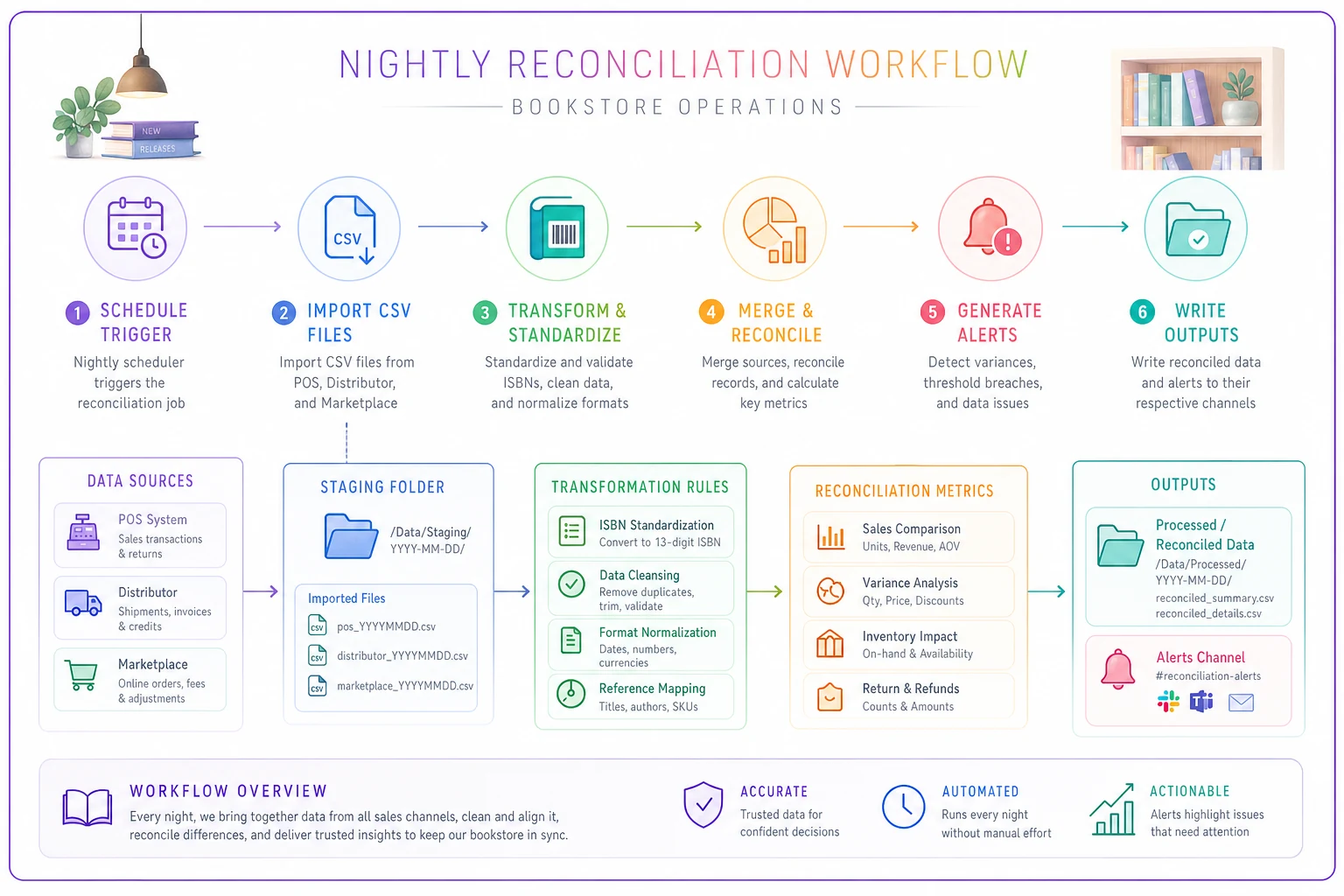
This visual shows the flow from raw imports through transforms to reconciled outputs and alerts.
The standardize_isbn function handles the messiest part. Here's what it needs to do:
Alert thresholds that prevent actual disasters
The reconciliation process needs to catch problems before they become customer complaints. These thresholds consistently catch the most critical issues across bookstore inventory setups.
Oversell Detection flags any SKU where pendingorders exceeds physicalcount minus 2. That minus-2 buffer accounts for typical POS lag—without it, you'll get false positives constantly.
Pricing Mismatch catches any item where POS price differs from distributor price by more than 15%. Publishers change prices and your POS doesn't always catch it. This threshold catches both accidental markdowns and missed price increases.
Inventory Drift triggers when physical count varies from system count by more than 3 units or 10%, whichever is greater. Small discrepancies happen—damaged books, samples, counting errors—but systematic drift usually means theft or a process breakdown somewhere.
Dead Stock Alert flags items with zero sales in 180 days and quantity above 5. These are the books eating your cash flow. The 5-unit threshold prevents alerting on single copies of slow movers.
def generatealerts(reconcileddata): alerts = [] for item in reconcileddata: # Critical: Oversell risk if item['pendingorders'] > item['physicalcount'] - 2: alerts.append({ 'severity': 'CRITICAL', 'type': 'OVERSELLRISK', 'isbn': item['isbn13'], 'title': item['title'], 'shortage': item['pendingorders'] - item['physicalcount'] }) # High: Pricing mismatch pricevariance = abs(item['posprice'] - item['distprice']) / item['distprice'] if pricevariance > 0.15: alerts.append({ 'severity': 'HIGH', 'type': 'PRICEMISMATCH', 'isbn': item['isbn13'], 'posprice': item['posprice'], 'correctprice': item['distprice'] }) # Medium: Inventory drift countvariance = abs(item['physical'] - item['system']) if countvariance > 3 or countvariance / item['system'] > 0.1: alerts.append({ 'severity': 'MEDIUM', 'type': 'INVENTORYDRIFT', 'isbn': item['isbn13'], 'physical': item['physical'], 'system': item['system'] })
Escalation rules sized for tiny teams
When you've got one to three people running the whole operation, not every alert needs immediate attention. The escalation framework has to match your actual capacity.
Critical alerts cover oversells and zero inventory on active orders:
-
Send SMS immediately
-
Email with subject line
"ACTION REQUIRED - [Store Name]"
-
Add to morning checklist
-
Block further sales on affected SKUs if possible
High priority alerts cover pricing errors and major inventory variances:
-
Email by 6 AM
-
Flag in daily dashboard
-
Require acknowledgment within 4 hours
Medium alerts cover reorder points and slow movers:
-
Batch into daily digest email
-
Review during weekly inventory meeting
-
No immediate action required
The implementation looks like this: def processalertescalation(alerts): criticalalerts = [a for a in alerts if a['severity'] == 'CRITICAL'] highalerts = [a for a in alerts if a['severity'] == 'HIGH'] mediumalerts = [a for a in alerts if a['severity'] == 'MEDIUM'] # Critical: Immediate notification if criticalalerts: sendsms(formatcriticalalerts(criticalalerts)) sendemail( to=OWNEREMAIL, subject=f"ACTION REQUIRED - {len(criticalalerts)} critical issues", body=formatcriticalalertsemail(criticalalerts), priority='HIGH' ) updatemorningchecklist(criticalalerts) # High: Morning notification if highalerts: scheduleemail( time='06:00', to=MANAGEREMAIL, subject=f"{len(highalerts)} pricing/inventory issues need review", body=formathighalertsemail(highalerts) ) # Medium: Daily digest if mediumalerts: addtodailydigest(medium_alerts)
Real CSV examples you can actually use
Your Square POS export probably looks something like this:
Date,Time,Transaction ID,Item,SKU,Quantity,Price,Tax,Total 2024-03-15,14:23:00,TXN-001,"The Great Gatsby",9780743273565,1,14.99,1.20,16.19 2024-03-15,14:45:00,TXN-002,"1984",978-0452284234,2,13.99,2.24,30.22
Your Ingram distributor file might look like: ISBN,Title,Publisher,List Price,Your Cost,On Hand,Available 0743273565,"The Great Gatsby","Scribner",14.99,8.99,145,143 0452284236,"1984","Signet",15.99,9.59,0,85
Notice the ISBN format mismatch? Square includes the 978 prefix for ISBN-13. Ingram still uses ISBN-10 for many titles. Your transform needs to handle both:
Transform Square POS data def transformsquarecsv(filepath): data = [] with open(filepath, 'r') as f: reader = csv.DictReader(f) for row in reader: # Clean up SKU field isbn = row['SKU'].replace('-', '').strip() transformedrow = { 'date': row['Date'], 'isbnoriginal': row['SKU'], 'isbn13': standardizeisbn(isbn), 'quantitysold': int(row['Quantity']), 'revenue': float(row['Total']) } data.append(transformedrow) return data # Transform Ingram data def transformingramcsv(filepath): data = [] with open(filepath, 'r') as f: reader = csv.DictReader(f) for row in reader: # Ingram uses ISBN-10, need to convert isbn13 = standardizeisbn(row['ISBN']) transformedrow = { 'isbn13': isbn13, 'title': row['Title'], 'listprice': float(row['List Price']), 'unitcost': float(row['Your Cost']), 'warehouseavailable': int(row['Available']) } data.append(transformed_row) return data
Sample cron schedule for bookstore operations
/etc/crontab entries for bookstore automation # 2:00 AM - Main nightly reconciliation 0 2 /usr/bin/python3 /scripts/nightlyreconciliation.py # 2:30 AM - Generate reorder suggestions 30 2 /usr/bin/python3 /scripts/generatereorders.py # 3:00 AM - Update marketplace inventory 0 3 /usr/bin/python3 /scripts/syncmarketplaceinventory.py # 6:00 AM - Send morning alerts digest 0 6 /usr/bin/python3 /scripts/morningalerts.py # Every 3 hours - Quick oversell check (9 AM, 12 PM, 3 PM, 6 PM) 0 9,12,15,18 /usr/bin/python3 /scripts/quickoversellcheck.py # 8:00 PM - End of day sales summary 0 20 /usr/bin/python3 /scripts/dailysalessummary.py # Sunday 4:00 AM - Weekly inventory variance report 0 4 0 /usr/bin/python3 /scripts/weeklyinventoryvariance.py # First Monday of month - Dead stock analysis 0 5 1-7 [ "$(date +\%u)" = "1" ] && /usr/bin/python3 /scripts/monthlydead_stock.py
The quick oversell check running every three hours during business hours is worth calling out. It's a lightweight script focused on one thing:
quickoversellcheck.py def quickoversellcheck(): # Only check items with recent sales or pending orders activeitems = getactiveitems() # Items sold in last 7 days for item in activeitems: currentstock = getcurrentstock(item['isbn13']) pendingorders = getpendingorders(item['isbn13']) if pendingorders > currentstock: sendimmediatealert( f"OVERSELL WARNING: {item['title']} - " f"Stock: {currentstock}, Pending: {pendingorders}" ) # Try to prevent further damage pauseonlinelistings(item['isbn13'])
Building the reconciliation pipeline
The reconciliation process is where everything comes together—comparing data across multiple systems to find discrepancies before they become problems.
import csv import json from datetime import datetime, timedelta class BookstoreReconciliation: def init(self, configfile): with open(configfile) as f: self.config = json.load(f) self.posdata = [] self.inventorydata = [] self.marketplacedata = [] self.reconciled = [] self.alerts = [] def rundailyreconciliation(self): # Step 1: Load all data sources self.loadposdata() self.loadinventorydata() self.loadmarketplacedata() # Step 2: Match and merge records self.mergedatasources() # Step 3: Calculate variances self.calculatevariances() # Step 4: Check business rules self.applybusinessrules() # Step 5: Generate outputs self.generatealerts() self.exportreconciliation() self.triggerescalations() def calculatevariances(self): for item in self.reconciled: # Sales velocity for reorder decisions item['dailyvelocity'] = self.calculatevelocity( item['isbn13'], lookbackdays=30 ) # Days of supply remaining if item['dailyvelocity'] > 0: item['dayssupply'] = item['onhand'] / item['dailyvelocity'] else: item['dayssupply'] = 999 # Infinite for zero-velocity items # Revenue at risk from stockouts item['revenueatrisk'] = ( item['dailyvelocity'] item['averageprice'] 7 # Next week's potential lost sales ) # Inventory investment tied up in slow movers if item['dailyvelocity'] < 0.1: # Less than 1 sale per 10 days item['deadstockvalue'] = item['onhand'] * item['unitcost'] else: item['deadstock_value'] = 0
The variance calculations reveal patterns you'd never catch manually. A book selling 0.3 units daily with only 2 copies on the shelf has less than a week of supply. If Ingram takes 10 days to deliver, you're already behind before you've even noticed the problem.
Why existing tools fail for small bookstores
Most inventory management systems assume you have dedicated staff watching dashboards all day. They fire off hundreds of alerts without any prioritization, require manual CSV uploads, and have no concept of the ISBN chaos that defines book retail.
Stores that try to use generic retail software keep running into the same wall. The system treats ISBN-10 and ISBN-13 as separate products, so you end up with duplicate inventory records. Reorder suggestions don't account for publisher minimums. Reconciliation tools can't handle format variations across different book distributors.
This is where purpose-built automation actually matters. When you're running a bookstore with two or three people, you need systems that understand your specific operational reality—ISBN variations handled automatically, alerts that respect the fact that you can't drop everything for a minor issue, and reconciliation that runs overnight without anyone babysitting it.
Modern AI-assisted platforms handle these bookstore-specific requirements far better than generic tools. They can learn your ISBN mapping patterns, factor in seasonal buying cycles, and flag which titles are trending toward dead stock based on early sales velocity. More importantly, they package all that complexity into a simple morning report that helps you make decisions instead of drowning you in raw data.
Critical decision points in your automation setup
Before implementing any of this, a few decisions need to be made based on your specific operation.
Reconciliation frequency: Daily is standard, but stores with lower transaction volume can sometimes get away with every other day. High-volume stores or those with aggressive online selling might need twice-daily runs.
Alert thresholds: The numbers above work well for most stores doing somewhere between $300k–$800k annually. If you're smaller, tighten them. If you're larger, you'll need more buffer.
Data retention: Keep raw import files for at least 90 days. You'll need them when something breaks and you have to trace back an error. Reconciled files can be archived after 30 days.
Manual override processes: Automation will occasionally be wrong. You need a straightforward way to adjust inventory counts or suppress alerts for known issues. A simple CSV with override rules that gets checked during processing works well enough.
| Store Size (Annual Revenue) | Reconciliation Frequency | Alert Buffer | Data Retention |
|---|---|---|---|
| Under $200k | Every other day | Tight thresholds | 60 days |
| $200k–$500k | Daily | Standard thresholds | 90 days |
| $500k–$800k | Daily | Standard thresholds | 90 days |
| $800k+ | Twice daily | Wider buffer | 120+ days |
These ranges are approximations—your actual setup might vary depending on how many sales channels you run.
When automation actually pays off vs when it's overkill
If you're processing fewer than 20 transactions daily and carrying under 2,000 unique titles, manual processes might still be fine. The setup time won't pay back quickly enough.
-
Processing 40+ transactions daily
-
Managing inventory across multiple sales channels
-
Carrying 5,000+ unique SKUs
-
Running regular events that affect inventory
-
Dealing with special orders or pre-orders on a regular basis
The real tipping point is usually when mistakes start costing actual money. One oversold rare edition that you have to source from another seller at a loss can run you $50–100. Three of those per month and you're already losing more than a basic automation setup would cost.
Common pitfalls in bookstore automation
The biggest mistake is trying to automate everything at once. Start with the most painful manual process—usually the morning reconciliation between POS and inventory. Get that working reliably before adding marketplace sync or automated reordering.
Another problem is not handling exceptions properly. Your automation will encounter ISBNs it can't match, prices that don't make sense, inventory counts that are obviously off. If your script crashes on these instead of logging them and continuing, you'll wake up to no reconciliation report and a morning of manual catch-up work.
Seasonal patterns also get overlooked. December sales will break your normal reorder thresholds. Back-to-school creates unusual demand spikes. Your automation needs some date-aware logic to handle those.
The integration between your automated reconciliation and tools for avoiding oversells on marketplaces becomes critical as you grow. Your nightly jobs need to feed into those throttling mechanisms. And if you've already worked through duplicate edition cleanup, your CSV transforms should pull from that clean ISBN mapping—otherwise you'll just reintroduce the same chaos through the back door.
A complete working example
Picture a 2-person shop doing around $400k annually. Square for POS, Shopify for the website, AbeBooks for rare books, Ingram for most ordering.
A typical Monday morning used to look like this:
-
Download Sunday's Square sales report
-
Check Shopify orders from the weekend
-
Review AbeBooks orders
-
Compare everything against the Ingram inventory file
-
Update quantities across all platforms
-
Figure out what needs reordering
That's 90–120 minutes every Monday, with other days running maybe 45 minutes. With automation, here's what actually happens instead.
At 2 AM, the script pulls Square's daily transaction export, Shopify's order export via API, the AbeBooks order file via FTP, and Ingram's inventory update. By 2:15 AM, everything is standardized to ISBN-13 and merged into a single reconciliation file. The system flags 3 books oversold on AbeBooks from weekend sales, 7 titles hitting reorder points, 2 pricing discrepancies where Square is showing old prices, and 43 slow-moving titles with no sales in six months.
By 2:30 AM, it automatically removes the oversold AbeBooks listings, generates an Ingram reorder suggestion CSV, creates a price update file for Square import, and compiles the dead stock report.
At 6 AM, you get one email: critical oversells needing customer communication, two price fixes to apply in Square, a reorder list to approve, and a dead stock report for your quarterly review.
Monday morning now takes about 15 minutes. The other 75–105 minutes? You can spend it on customer service, merchandising, or actually reading some of the books you sell.
The technical architecture that scales
As volume grows, this basic architecture holds up reasonably well. The same CSV transform logic that handles 50 daily transactions can handle 500—you just need a few optimizations:
For larger scale operations, batch process in chunks def processlargereconciliation(chunksize=1000): totalitems = countinventoryitems() for offset in range(0, totalitems, chunksize): chunk = loadinventorychunk(offset, chunksize) # Process chunk in parallel if possible results = parallelprocess(chunk, workercount=4) # Write results incrementally appendtoreconciliation(results) # Generate alerts as we go checkalerts(results)
Alert thresholds will also need revisiting at higher volumes. A single oversell in a 50-transaction day is a bigger deal than one in a 500-transaction day. Your escalation rules should account for this: def calculatealertseverity(issuetype, volumecontext): baseseverity = ISSUESEVERITIES[issuetype] # Adjust based on volume if volumecontext['dailytransactions'] > 200: if issuetype == 'OVERSELL' and issuecount < 3: return 'HIGH' # Downgrade from CRITICAL else: if issuetype == 'PRICEMISMATCH' and variance < 0.10: return 'LOW' # More sensitive in lower volume return baseseverity
Volume-aware severity keeps your alerts meaningful as you grow. Without it, a busy December will flood you with critical notifications that don't actually require the same response as a slow Tuesday oversell.
Making it sustainable for your team
Setting up the automation is usually the easy part. Maintaining it when things change is harder—your POS updates their export format, Ingram changes their file structure, a new marketplace needs integration.
-
Configuration over code
Put file paths, column names, and thresholds in config files, not hardcoded in scripts
-
Logging everything
When something breaks six months from now, you'll need those logs to figure out what changed
-
Test data sets
Keep sample files from each source so you can verify your transforms still work after updates
-
Documentation
Write down not just what the code does, but why you made specific decisions about thresholds and logic
-
Manual fallback
Always maintain the ability to run the core reconciliation manually if automation fails
Keep test files from each vendor versioned so you can quickly validate transforms after format changes.
The goal isn't to eliminate all manual work. It's to eliminate the repetitive, error-prone parts while preserving human judgment for decisions that actually matter. Your automation should surface problems and suggest solutions—not make autonomous calls about your inventory.
Moving from chaos to clarity
Don't try to implement all of this at once. Start with the highest-value problem—usually oversell prevention or reorder optimization. Get one piece working reliably before adding the next.
Track your metrics before and after. How many oversells did you have last month? How often did you run out of steady sellers? What's your dead stock percentage? Those numbers tell you whether the automation is actually helping or just moving problems around.
Within about three months, most stores see 60–90 minutes saved daily on routine reconciliation, 70–80% fewer oversell incidents, a meaningful reduction in stockouts on regular sellers, and earlier identification of dead stock—catching it at 90 days instead of never.
But the biggest win isn't time saved or errors prevented. It's the mental space you get back. When you trust that your systems will catch problems before customers notice them, you can focus on what actually needs human creativity—curating your selection, building customer relationships, running events that make your store a community hub.
Your bookstore's back office doesn't need to run on chaos and hope. With the right CSV transforms, a sensible cron schedule, and graduated alerts, even the smallest team can maintain real operational control. The blueprint here isn't theoretical—it's based on what actually works in real bookstores dealing with real operational challenges every day.
Your bookstore's back office doesn't need to run on chaos and hope. With the right CSV transforms, a sensible cron schedule, and graduated alerts, even the smallest team can maintain real operational control. The blueprint here isn't theoretical—it's based on what actually works in real bookstores dealing with real operational challenges every day.