
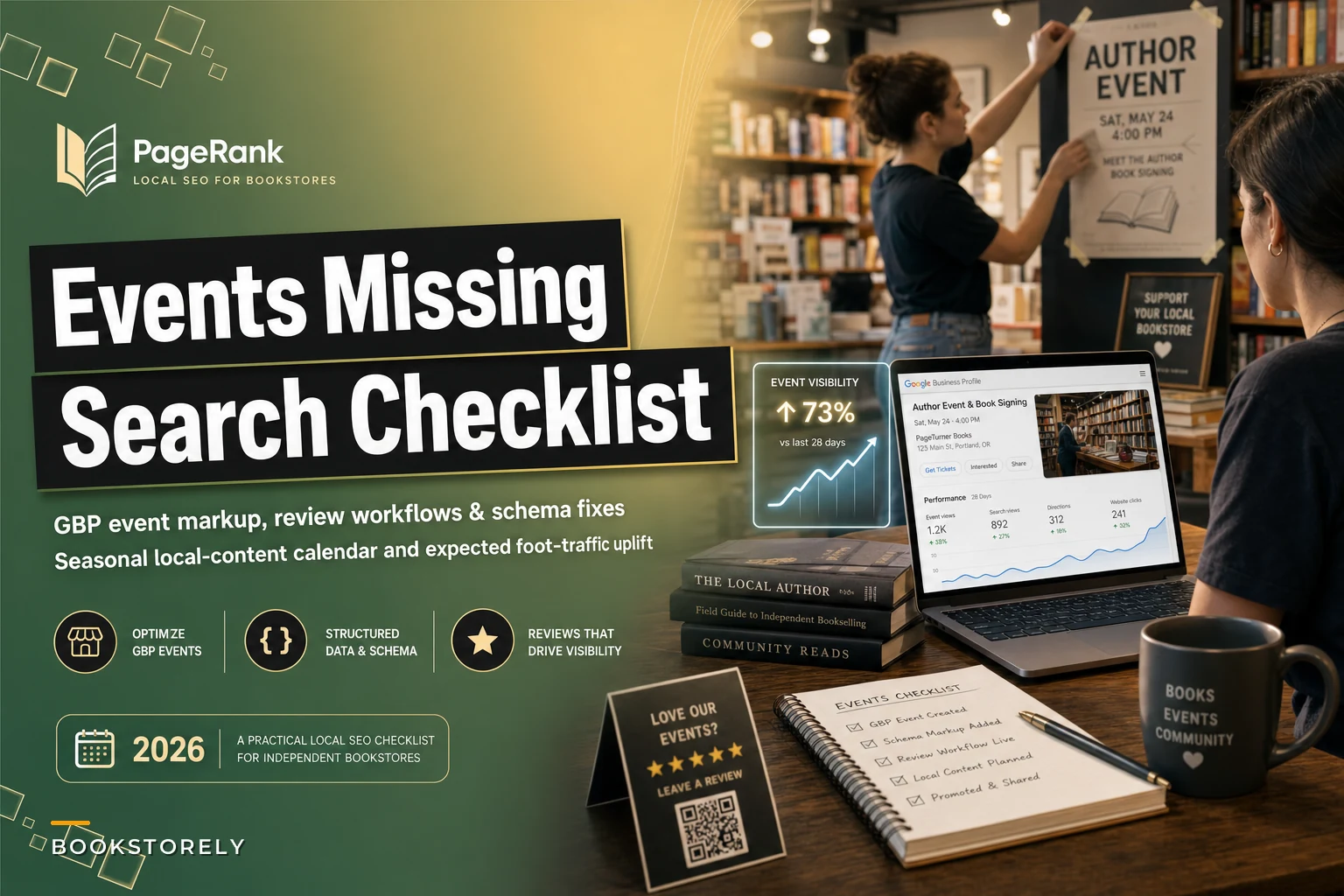

Your author reading last Thursday had twelve people show up. Not terrible, but you'd prepared seating for forty. The publisher sent books, you made coffee, your staff stayed late. Meanwhile, three blocks away, someone googled "book events near me tonight" and drove to Barnes & Noble instead.
This happens constantly to indie bookstores. Not because your events aren't worth attending, but because Google literally doesn't know they exist.
The invisible bookstore problem that costs you hundreds of customers monthly
Your author reading last Thursday had twelve people show up. Not terrible, but you'd prepared seating for forty. The publisher sent books, you made coffee, your staff stayed late. Meanwhile, three blocks away, someone googled "book events near me tonight" and drove to Barnes & Noble instead.
This happens constantly to indie bookstores. Not because your events aren't worth attending, but because Google literally doesn't know they exist.
Why Google can't find your bookstore events
Most bookstore local SEO fails at the technical level. You post events on Facebook, maybe Instagram, definitely your website. But none of that matters if Google's crawlers can't parse what you're doing.
Search engines need structured data to understand events—specific markup telling them: this is an event, it happens at this time, at this location, with these details. Without it, your author reading might as well not exist online.
Google Business Profile is the most direct path to local visibility, yet bookstores treat it like a yellow pages listing. Update the hours, add some photos, forget about it for six months. The stores actually winning local search treat their GBP like a second website—posting events, updates, and fresh content multiple times a week.
Reviews get even worse treatment. Bookstores average around 3 reviews per quarter, while coffee shops in the same neighborhood pull 18 to 25. Those reviews directly affect your local pack rankings. Every missing review pushes you down further when someone searches "bookstores near me."
Setting up Google Business Profile event posts correctly
Your GBP needs event posts, not just regular updates. There's a specific event post type that includes:
-
Event title (keep it under 58 characters for mobile display)
-
Date and time (use exact start/end times, not "evening")
-
Event description (front-load the key details in the first 100 characters)
-
Call-to-action button (usually "Learn More" linking to your site)
-
Event image (1200x675px minimum, text overlay optional)
Post events 7–10 days before they happen. Google's algorithm favors fresh content but needs time to index and serve it in results. Posting your Thursday night reading on Wednesday afternoon guarantees low visibility.
Timing matters for engagement too. Posts published Tuesday through Thursday between 9 and 11 AM get noticeably more clicks than weekend posts. People check Google during work breaks, not Saturday mornings.
Keep descriptions specific but scannable. "Award-winning mystery author Jane Smith discusses her latest Nordic noir thriller" beats "Author event this Thursday!" Include the genre, any notable background, and what makes the event worth showing up for.
Building event schema markup that actually works
Schema markup sounds complex but it's basically just labeling your content so search engines understand it. For bookstore events, you need Event schema with these required properties:
{ "@context": "https://schema.org", "@type": "Event", "name": "Mystery Author Jane Smith Reading", "startDate": "2024-03-14T19:00-05:00", "endDate": "2024-03-14T20:30-05:00", "location": { "@type": "Place", "name": "Main Street Books", "address": { "@type": "PostalAddress", "streetAddress": "123 Main Street", "addressLocality": "Portland", "addressRegion": "OR", "postalCode": "97204" } }, "description": "Award-winning mystery author Jane Smith reads from her latest Nordic noir thriller", "image": "https://yourdomain.com/event-image.jpg", "offers": { "@type": "Offer", "price": "0", "priceCurrency": "USD", "url": "https://yourdomain.com/events/jane-smith" } }
Add this to every event page on your site. If you're on WordPress, plugins like Schema Pro or Yoast handle most of it automatically. For custom sites, you'll need to add the JSON-LD script directly to your event template.
Fields that often get skipped: offers (even for free events), performer (for author readings), and organizer (usually your bookstore). Missing these reduces your shot at rich snippets in search results.
Test your markup using Google's Rich Results Test tool. Common errors include wrong date formats (use ISO 8601), missing location data, and broken image URLs. Fix these before publishing or the markup does nothing.
Creating a review collection workflow
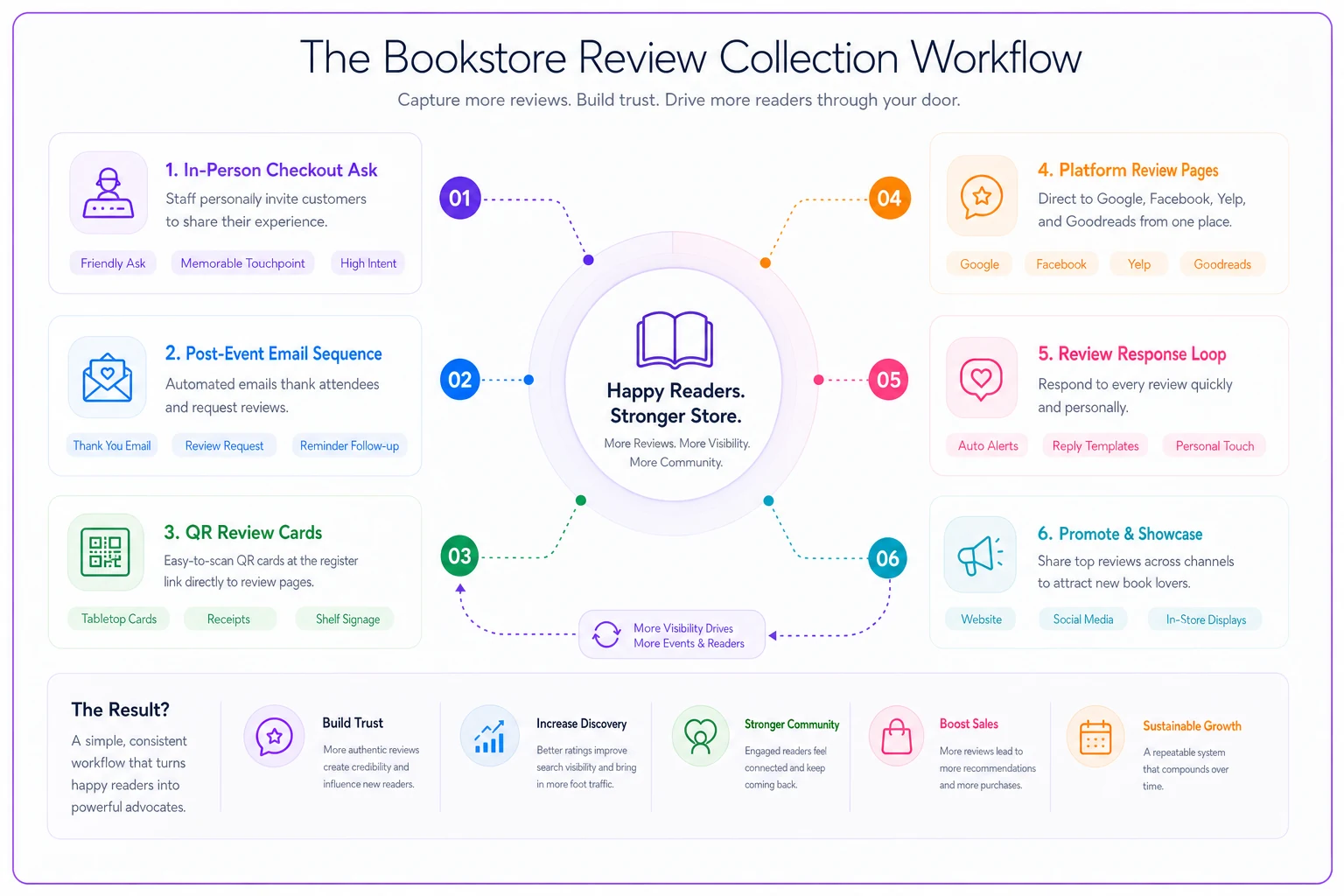
Reviews need a system, not optimism. The most effective bookstores build review requests into checkout and event follow-ups.
At checkout, train staff to mention it naturally during the receipt handoff: "If you enjoyed your visit, a quick Google review really helps other readers find us." Simple, not pushy, and it works more than you'd expect.
For events, send a follow-up email 24–48 hours later. Include a direct link to your Google review page (find it in your GBP dashboard under "Get more reviews"), a thank-you note, maybe a photo from the event, then ask for feedback.
Print review request cards—business card size with a QR code linking to your review page. Hand these out with purchases over $30 or at event registration. Physical reminders tend to land better with the 45+ crowd that makes up a good chunk of bookstore foot traffic.
Watch your review velocity. Sudden spikes look suspicious to Google's algorithm. Two to four new reviews weekly is a much healthier pace than 20 reviews after one big push.
Respond to every review within 48 hours. Thank positive reviewers by name, reference something specific from their comment, and work in a mention of upcoming events or new arrivals. For negative reviews, acknowledge the issue, apologize where it's warranted, and offer to talk offline. Don't argue publicly—it never looks good.
Here's a simple workflow diagram:
Train one shift first and monitor conversion—small, consistent tweaks beat wholesale changes that confuse staff.
For events, send a follow-up email 24–48 hours later. Include a direct link to your Google review page (find it in your GBP dashboard under "Get more reviews"), a thank-you note, maybe a photo from the event, then ask for feedback.
Monthly local content calendar that drives foot traffic
January: Reading challenges, organization books, New Year reading lists. Posts like "Books by local Portland authors" or "2024 reading tracker picks" perform well—these terms spike in January search volume.
February: Romance obviously, but also Black History Month displays. Create dedicated GBP posts for both. Local angles work well here—"Portland love stories" or "Pacific Northwest Black authors."
March: Women's History Month plus spring break reading. Parents search "kids books spring break" and "travel reads" heavily in early March.
April: National Poetry Month and Earth Day. Poetry events typically draw bigger crowds in April. Environmental books get unusual traction late in the month.
May–June: Graduation gifts, summer reading prep, Pride Month. "Beach reads" searches start ramping mid-May. Pride book displays photograph well for social and GBP posts.
July–August: Peak summer reading, back-to-school prep kicks in. Required reading lists drive real traffic. Create posts targeting "[School Name] summer reading list" for every local school you can.
September: Back-to-school in full swing, Banned Books Week. Banned book displays generate solid engagement and sometimes local press coverage.
October: Halloween, mystery/thriller focus, start holiday book planning. "Spooky reads" and "Halloween books for kids" both surge in search.
November–December: Holiday gift guides dominate. Create targeted guides early—"Books for dad," "Young adult gift ideas," "Local author gift guide." Post them in early November for maximum impact.
Within each month, a consistent posting rhythm helps:
-
Week 1
Upcoming events post
-
Week 2
New arrival highlights
-
Week 3
Staff picks or book club selections
-
Week 4
Community focus (local author, neighborhood event, etc.)
Planning a few weeks ahead changes that.
Measuring actual foot traffic improvements
Track these monthly to know whether your efforts are actually moving the needle.
Google Business Profile insights show direction requests, total views, discovery searches, phone calls, and photo views. Direction requests correlate most strongly with actual store visits. Bookstores that get local SEO right often see 25–40% increases in direction requests within 60 days.
Set up Google Analytics to track website visitors coming from GBP. Create a custom UTM parameter for all GBP links—this tells you which posts actually drive traffic versus just racking up impressions.
Physical foot traffic requires manual tracking unless you have counters. A simple method: tally hourly customer counts for one week per month, then compare during similar weather conditions month-over-month.
Event attendance is the clearest signal. Track RSVPs versus actual attendance, but more importantly track first-time versus repeat attendees. New faces mean local SEO is pulling in people who didn't already know about you.
| Timeline | Expected Improvement |
|---|---|
| Month 1 | 15–20% increase in GBP views |
| Month 2 | 20–30% increase in direction requests |
| Month 3 | 10–15% increase in foot traffic |
| Month 6 | 25–35% sustained traffic improvement |
These assume consistent execution. Missing weeks of posts or letting reviews go stale kills momentum fast.
The structured data testing routine
Before any event goes live, run three checks.
First, Google's Rich Results Test. Paste your event URL and look for errors. Common failures: missing performer info, incorrect date formatting, image URLs that don't load. The test shows exactly which fields fail.
Second, check how the event looks in Google's Event Search preview. Not every marked-up event qualifies, but when they do, you'll see a rich card with image, date, and location. If yours doesn't appear, the description is usually too short or the image doesn't meet requirements.
Third, verify your GBP event post actually went live. Posts sometimes get flagged for manual review, especially ones with prices or registration links. Check your dashboard for rejection notices—rejected posts need quick edits and resubmission or you lose the visibility window entirely.
A simple spreadsheet to track:
| Field | Detail |
|---|---|
| Event name | Title as posted |
| Post date | When it went live |
| Schema validation | Pass or fail |
| GBP post status | Live, pending, or rejected |
| Day-of attendance | Actual headcount |
Over time this data reveals patterns. Maybe Thursday events consistently outperform Tuesday ones, or author readings beat book clubs for search visibility. Use it.
Building review momentum without being pushy
The bookstores pulling in 10+ reviews monthly have systems. A workflow that generates consistent reviews without making customers uncomfortable starts with training staff on natural review mentions—not scripts, just phrases they can adapt:
-
"We're a small local bookstore and Google reviews really help people find us"
-
"If you enjoyed discovering that book, we'd love a quick review"
-
"Reviews help us bring in more authors for events"
Build multiple touchpoints without overdoing it. Someone buying a single paperback probably won't review you. But someone who attends an event, joins your book club, places a special order, or drops $50+ in a visit—those customers already showed commitment. They're the ones to ask.
The post-event email sequence that tends to work:
-
Day 1
Thank you email with event photos
-
Day 3
Follow-up with related book recommendations and a review request
-
Day 7
Final touch with upcoming events and a gentle reminder
Keep review links short. Use a URL shortener to create something like "mainstreetbooks.com/review" that redirects to your Google review page. Print this on bookmarks, receipts, business cards.
For book clubs specifically, make reviews part of the culture. Mention at each meeting that reviews help the store stay visible to new readers. Book club members tend to become your most reliable reviewers—they visit monthly and genuinely feel invested in the store's success.
Common local SEO mistakes crushing bookstore visibility
The same errors show up over and over across bookstore websites and profiles.
NAP inconsistency kills local rankings. Your Name, Address, and Phone must match exactly across Google Business Profile, your website footer, Facebook, Yelp, Apple Maps, and any industry directories. "Main Street Books" versus "Main St. Books" seems trivial but confuses search algorithms. Pick one format and use it everywhere.
Category selection in GBP matters more than most people realize. Primary category should be "Book Store," not "Gift Shop" or "Retail Store." Add secondary categories like "Children's Book Store" or "Used Book Store" only if they represent a real portion of your business.
Hours accuracy seems obvious, but bookstores constantly forget to update for holidays, author events that run late, or seasonal schedule changes. Wrong hours in GBP lead directly to negative reviews from customers who showed up to a locked door.
Photo optimization gets ignored almost entirely. Your GBP photos need an exterior shot showing your signage clearly, interior shots of different sections, event photos with decent crowds, staff photos with names in descriptions, and new arrivals or display updates at least monthly. Name photos descriptively: "Mystery section at Main Street Books Portland" not "IMG_4567." Google reads filenames.
Website mobile speed is a quiet killer. Bookstore sites loaded with high-res cover images often score below 30 on Google's PageSpeed mobile test. Compress images, use lazy loading, consider a CDN. Slow sites rank poorly in local search, and most local searches happen on phones.
Turning seasonal campaigns into search visibility wins
Seasonal content gives bookstores natural hooks for local SEO, but execution usually lacks follow-through. Instead of just changing window displays, build campaigns that extend from physical to digital.
Summer reading programs pull significant search volume from May through July. A dedicated landing page with grade-specific lists, local school reading requirements, downloadable reading trackers, and weekly challenges gives you something worth ranking. Update your GBP posts weekly during this stretch. Parents searching "summer reading programs near me" need to find content that's current, not from two summers ago.
Back-to-school prep needs to start earlier than most bookstores expect. Post required reading lists in early July. By late August when parents panic, you've had three months of relevant content building authority.
Holiday gift guides need real segmentation. "Books for everyone" doesn't rank. Specific guides do—books for remote workers, Portland-themed gifts, books for reluctant readers, gifts under $15. Each guide becomes a GBP post, a website page, and an email. The specificity helps you show up for long-tail searches like "books for dad who likes history."
For each seasonal push, supporting content helps:
-
Staff video recommendations (post to GBP)
-
Customer testimonials from past years
-
Photo galleries of displays
-
Event tie-ins like gift wrapping parties
This kind of content signals seasonal authority to search engines without requiring you to reinvent everything each year.
What realistic foot traffic gains actually look like
Bookstores that implement local SEO properly see predictable patterns. Knowing what to expect prevents early discouragement.
Months 1–2: Mostly technical improvement. Events start appearing in search, GBP gets more views, but foot traffic barely moves. This foundation phase matters even when results feel invisible.
Months 3–4: Review velocity picks up, regular customers notice your improved online presence. Event attendance climbs 15–20%. Direction requests jump. New faces start showing up at events.
Months 5–6: A sustainable rhythm starts forming. You're showing up in the local 3-pack for "bookstore near me" searches. Event discovery through Google drives 30–40% of attendance. Foot traffic is clearly up 20–25% over your pre-optimization baseline.
Months 7–12: The compounding effect kicks in. Better visibility drives more reviews, which improves rankings, which drives more visibility. Foot traffic stabilizes around 30–35% above where you started. Some high-performing events see double their previous attendance.
| Timeline | Estimated Monthly Customers |
|---|---|
| Month 3 | 850–900 |
| Month 6 | 950–1,000 |
| Month 12 | 1,000–1,100 |
These aren't dramatic numbers. But on thin margins, 250 additional monthly customers is meaningful revenue—and these customers found you through intent-driven searches, which makes them better prospects for events and special orders than people who just stumbled in.
Building sustainable local SEO operations
Most bookstores treat local SEO as a one-time project. That's why improvements fade after a few months.
Assign ownership clearly. Someone needs responsibility for weekly GBP posts, monthly event markup verification, review responses within 48 hours, quarterly photo updates, and an annual citation audit. This takes roughly 4–6 hours weekly. Without a designated owner, tasks slip during busy stretches.
Create templates for the repetitive stuff:
-
Event post templates with placeholder text
-
Review response templates (customize each actual response)
-
Email templates for review requests
-
Schema markup templates for different event types
Templates lower the friction enough that a part-timer can handle GBP posts reliably.
Set up basic monitoring—Google Alerts for your bookstore name, weekly GBP Insights review, review notifications to a designated inbox, and monthly rank tracking for key terms. Regular monitoring catches problems early. A negative review sitting unanswered for two weeks does more damage than just irritating one customer.
Document what's working: your annual calendar with seasonal focuses, event types that drive best attendance, review request methods that actually convert, photo types that get engagement. This documentation becomes valuable when staff turns over. It also separates what's actually working from what you assume is working.
Tools worth considering: Buffer or Hootsuite for scheduling GBP posts in advance, BrightLocal or Whitespark for monitoring citations and rankings. Even basic scheduling saves hours monthly while maintaining consistency.
The bookstores winning at local SEO treat it like inventory management—a core operational function that needs steady attention, not occasional bursts of effort.
Making the technical components manageable
Technical SEO sounds intimidating but the essential pieces are straightforward when broken into specific tasks.
Start with a basic audit:
-
Run your website through Google's Mobile-Friendly Test
-
Check PageSpeed Insights for mobile and desktop scores
-
Verify your robots.txt isn't blocking important pages
-
Make sure your sitemap exists and is submitted to Google Search Console
-
Check that event pages have unique URLs (not just calendar popups)
Most bookstore sites fail mobile speed tests because of unoptimized images. Book covers at 300dpi look great in print but destroy page load times. Resize covers to under 100kb for web. TinyPNG handles this in bulk without much effort.
Set up Google Search Console if you haven't. It's free and shows which searches bring people to your site, pages with errors or warnings, mobile usability issues, and schema markup problems. Check it monthly. Fix errors quickly—they compound.
Local citations need quarterly attention. Your bookstore shows up in dozens of online directories, most with outdated information. Focus on the major ones: Google Business Profile, Apple Maps, Bing Places, Facebook, Yelp, YellowPages, your chamber of commerce directory, and industry-specific directories like IndieBound. Use consistent formatting everywhere.
For WordPress sites, these plugins cover the basics: Yoast or RankMath for SEO, a schema plugin for structured data, a caching plugin like WP Rocket, and an image optimization plugin. Configure them once properly rather than constantly tweaking.
A monthly technical checklist:
-
Test three random event pages for schema validation
-
Check mobile speed score
-
Verify hours accuracy across platforms
-
Review Search Console for errors
-
Update at least five photos in GBP
-
Audit one directory listing for accuracy
This kind of routine keeps technical debt from quietly building up and undercutting everything else you're doing.
Local SEO success for bookstores comes down to consistency more than anything technical. The stores dominating local search aren't doing anything clever—they're doing the basics reliably, month after month, while competitors post sporadically and hope for the best. Start with Google Business Profile and review collection. Add schema markup and seasonal content as those foundations stabilize. Build systems that make local SEO as routine as ordering new inventory. The foot traffic gains follow predictably from there.