


Most bookstore owners already know their front table matters. What they don't have is a way to prove which version of that front table makes money. You move a stack of staff picks, swap a shelf talker, flip a window display — and three weeks later you think it worked, but you can't separate it from the new release that dropped the same week or the rainy Tuesday that killed foot traffic.
That gap — between "the display looks better" and "the display sold more" — is the whole problem. Bookstore visual merchandising conversion isn't about prettier signs. It's about building a repeatable system where every display change produces a measurable signal, and where your signage, your POS, and your test protocol all speak the same language.
This article covers that system: a standards library for signage, templates you can reuse, a way to link displays to actual register conversions, and a 4-week test protocol with a reporting checklist. The goal is that any person on your team can run a display experiment the same way, and you can trust the result.
Why display results stay invisible in most shops
The core issue isn't effort. Indie booksellers obsess over their displays. The issue is that merchandising lives in one world and sales data lives in another, and nobody built the bridge between them.
A staff member builds a gorgeous "Cozy Fall Reads" table. It feels like it's working — people stop, people browse. But at the register, nobody's tracking which of those sales came off that table versus the regular fiction shelves. The POS sees an ISBN sold. It doesn't see that the book was front-and-center under a hand-lettered sign.
So when you ask "did the fall table work?", the honest answer is a shrug plus a vibe. And vibes are expensive. A front table in a 1,200-square-foot shop is some of the most valuable real estate you own. If you're guessing about what belongs there, you're guessing with your best square footage.
A few patterns come up again and again:
-
No consistent signage. Every display uses a different font, size, and message style, so you can't compare one sign approach against another — there's no control.
-
No conversion capture. Sales are recorded, but not attributed to the display that drove them.
-
No fixed test window. Displays change whenever someone feels like it, so you never get a clean before/after read.
-
No single owner of the result. Three people touched the display and nobody wrote down what changed or when.
Any one of these alone makes measurement fuzzy. Together, they make it impossible.
The three systems that have to connect
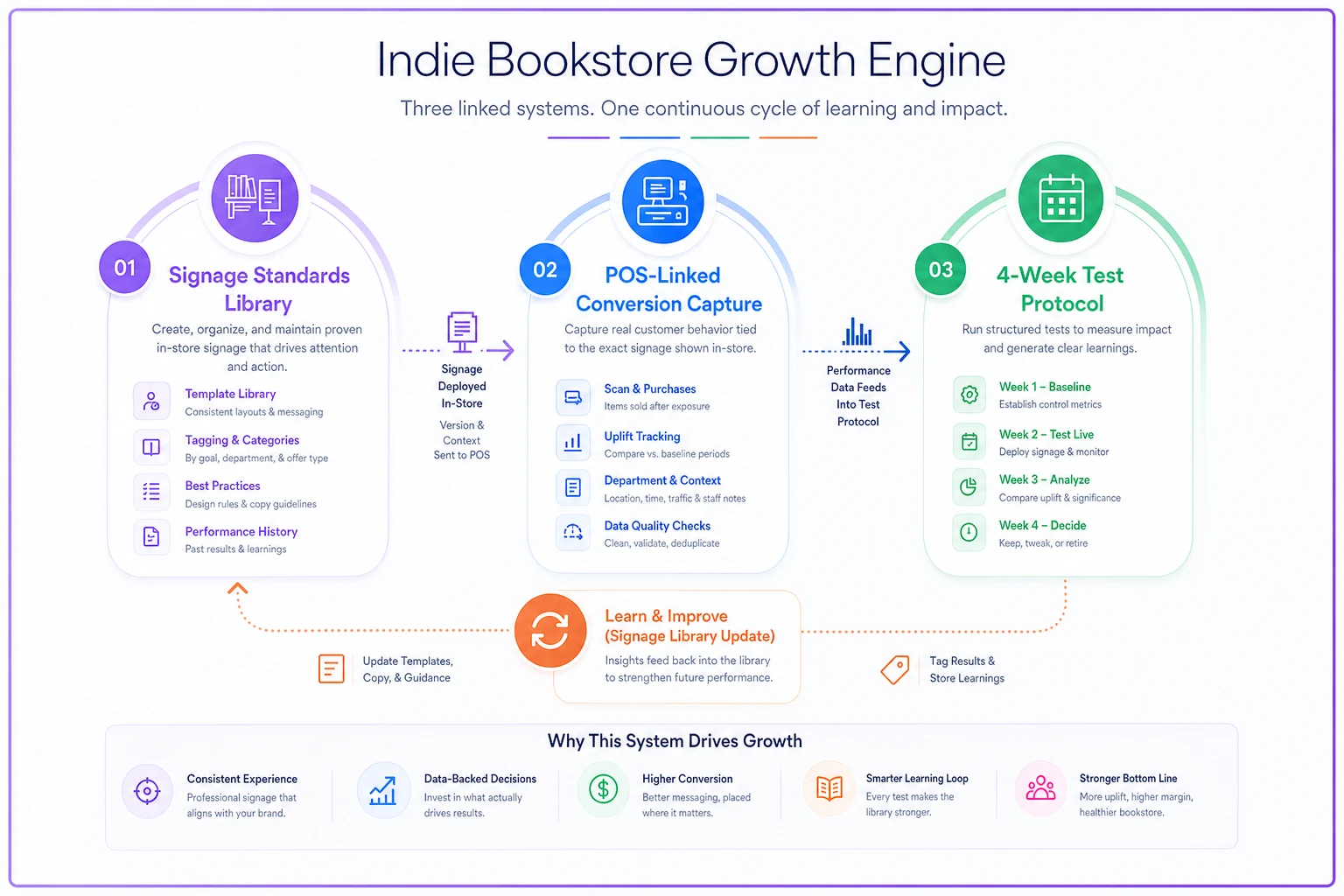
Think of merchandising measurement as three separate systems that most shops run disconnected. The payoff comes from wiring them together.
System one: the signage standards library. This is your fixed vocabulary — a small set of approved sign templates, sizes, and message formats. Standardizing here isn't about killing creativity. It's about having a control. If every sign is different, you can never learn whether a sign change caused a sales change. When your signs come from a fixed library, the display itself becomes the variable you're actually testing.
System two: POS-linked conversion capture. This is the bridge. You need some mechanism — a modifier, a tag, a short code, a dedicated section in your POS — that lets you say "this sale came from Display A." Without it, you're measuring category sales and hoping.
System three: the test protocol. A fixed 4-week window, a defined hypothesis, a control display, and a decision rule at the end. This is what turns a casual swap into an experiment.
When these three run together, something changes. You stop asking "does merchandising work?" and start asking "which specific display, with which specific sign, converts browsers into buyers — and by how much?" That's a question you can actually answer.
Here's a simple visual of how the three systems connect:
If you want the planogram and category-percentage side of this — how much shelf space each category should get and how seasonal templates fit in — that's worth reading alongside this one: A merchandising system for small bookstores: category-percentage planograms, seasonal templates and a 4‑week display ROI test.
Building the signage standards library
Start here because it's the cheapest to fix and it makes everything downstream measurable.
A standards library is a small, documented set of sign formats your team actually uses. The point is reusability and comparability. You want a staff member to produce a clean, on-brand sign in two minutes without a design decision, and you want every sign on the floor to be comparable to every other one.
A practical library for a small shop covers maybe five or six template types:
| Template type | Use case | Standard size | Message rule |
|---|---|---|---|
| Table header | Front/feature table title | 5x7 tent or 8.5x11 | 3–5 words, benefit or theme |
| Shelf talker | Single-title recommendation | 2x3.5 card | Staff name + one-line reason |
| Price/promo flag | Discount or bundle | 3x5 | Price + deadline, no fluff |
| Section sign | Category wayfinding | 8.5x11 | Category name only |
| Event tie-in | Display linked to an event | 5x7 | Event name + date |
| QR/capture card | Conversion or list signup | 3x5 | One action, one reason |
Keep the library to five or six templates so staff can memorize them.
The specific sizes matter less than the fact that you picked sizes and stick to them. Consistency is what lets you later test "handwritten shelf talker vs. printed shelf talker" as a clean variable, because everything else is held constant.
One mistake worth avoiding: don't let the library grow to twenty template types. The whole value is a small, repeatable set. If you have a template for every possible situation, staff won't memorize it and you're back to one-off signs.
The copy on a shelf talker is itself testable, too. "Staff pick" versus a specific one-line reason ("If you loved Pachinko, start here") are different messages, and they convert differently. Keep a running doc of your message formats so your A/B tests can isolate copy as a variable, not just placement.
POS-linked conversion capture: the piece everyone skips
This is where most measurement attempts die, so it's worth being concrete.
A few realistic options for linking a sale to a display, roughly from lowest to highest friction:
-
Dedicated POS tag or modifier. If your POS supports custom tags or a quick-sale modifier, your register staff taps "Display A" when they ring a book that came off a feature table. Low tech, surprisingly reliable if staff are trained.
-
ISBN watchlist attribution. Pull a list of exactly which titles are on each display. Then, during the test window, filter sales reports for those ISBNs. This works if the same titles aren't also stocked heavily elsewhere in the store — which would muddy attribution.
-
QR / capture card. A small card on the display with a QR code — "Join our fall reads list" or "See the full list." Scans give you an engagement signal and an email capture, even if the person doesn't buy today.
-
Bundle/promo SKU. If the display is a bundle, it gets its own SKU, and attribution is automatic.
None of these are perfect. The ISBN watchlist method is the most common because it needs no register behavior change, but it fails when a bestseller sits both on your front table and in the fiction section. The POS tag method is cleaner but depends on staff remembering to tap it during a rush. Most shops end up with a hybrid — ISBN watchlist as the baseline, QR capture for engagement, and a tag for high-value displays worth the extra discipline.
The operational pattern that makes capture actually work: one person owns the ISBN list for the display, written down at setup, dated. When you can't trust that the list of titles on the table matches the list you're filtering against, every number afterward is suspect. This is a small bookstore inventory-taxonomy problem wearing a merchandising costume — if your editions and ISBNs are messy, attribution is messy.
A simple conversion-capture form at setup should record:
-
Display name and location (front table, window, endcap 3)
-
Start date and planned end date (fixed 4-week window)
-
Exact ISBN list on the display
-
Sign template(s) used (from the library)
-
The hypothesis ("Handwritten shelf talkers will out-convert printed ones")
-
The control (what it's being compared against)
-
Who owns the result
If that form isn't filled out before the display goes up, the test doesn't count. That rule sounds rigid, but it's the single thing that separates real measurement from vibes.
The 4-week display experiment protocol
Four weeks is the sweet spot for most indie shops. Shorter and low foot traffic gives you too little data; longer and seasonality, new releases, and staff changes start to contaminate the read.
The protocol as a process you can hand to a team member:
-
Week 0 — Setup. Fill out the conversion-capture form. Build the display using library signage only. Define the control (either the same spot last period, or a paired display running simultaneously). Baseline the numbers: what did this real estate sell in the prior comparable period?
-
Weeks 1–4 — Run and don't touch. Resist the urge to "improve" the display mid-test. Every change resets your clean read. Restock the same titles if they sell through — don't quietly swap in different books, or you've changed the experiment.
-
Weekly check-in — Capture, don't adjust. Pull the attributed sales once a week. Note foot-traffic anomalies (weather, events, closures) so you can flag contaminated weeks.
-
Week 4 — Read the result. Compare attributed conversions against the control. Account for obvious confounds (a huge new release landing on the table inflates numbers unfairly).
-
Decision. Keep, revert, or iterate — and write down why.
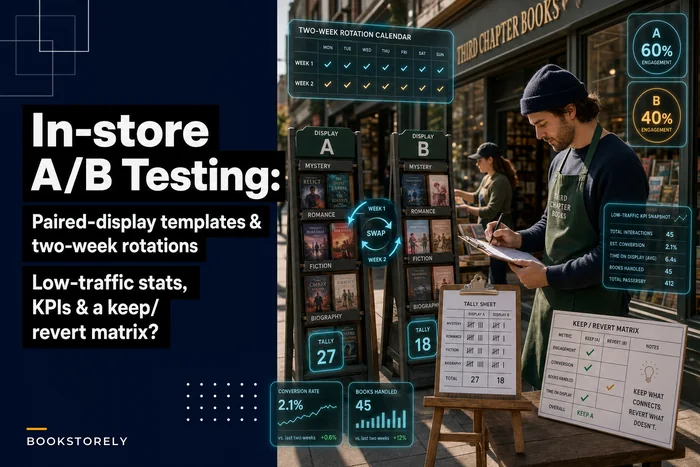
The paired-display approach — running two versions side by side at the same time — is usually more trustworthy than before/after, because it controls for week-to-week traffic swings. The mechanics of running paired displays in a low-traffic shop, and the decision matrix for keep-versus-revert, are worked through in detail here: In‑store A/B testing for bookstores: paired-display templates, low‑traffic stats and a keep/revert decision matrix.
The most common protocol failure isn't bad math — it's mid-test tampering. Someone tidies the display, restocks with different titles, or moves it two feet. Each small change invalidates the comparison, and at the end nobody can say what they actually tested. Discipline during the run matters more than sophistication in the analysis.
A real scenario: the fiction endcap test
A used-and-new indie shop, roughly 1,500 SKUs, wanted to know whether handwritten shelf talkers actually moved more books than clean printed cards, or whether owners just believed they did because it felt more personal.
They set up a paired test. Two endcaps, same category (literary fiction), same six titles on each, same 4-week window. Endcap A used printed library cards with a one-line reason. Endcap B used handwritten cards with a staff name and the same reason. Everything else — placement, lighting, titles — held constant. They attributed sales using the ISBN watchlist method plus a POS tag on those specific endcaps.
Baseline weekly sales off that fiction real estate had been running around $180–$220. Over the four weeks, the handwritten endcap pulled noticeably ahead — somewhere in the range of 20–30% more units on the tagged titles. Not a dramatic blowout, but consistent across three of the four weeks. Week two was contaminated by an author event that spiked traffic unevenly, so they flagged and discounted it.
The outcome wasn't "handwritten always wins." It was narrower and more useful: for literary fiction, with a named staff recommendation, handwritten converts better — enough to justify the extra 10 minutes per card. They made handwritten the standard for staff-pick displays and kept printed cards for pure wayfinding. That's a decision you can only make when capture and protocol are in place. Without them, it's just a preference argument that never ends.
The reporting checklist for every 4-week test
At the end of each experiment, the person who owns the result fills this out. If a box can't be checked, the result gets a caveat, not a confident conclusion.
-
- [ ] Conversion-capture form was completed before the display went up
-
- [ ] Only library signage was used (no one-off signs mid-test)
-
- [ ] The display ran the full fixed window without mid-test changes
-
- [ ] The exact ISBN list was recorded and matched the titles actually on the display
-
- [ ] A clear control existed (paired display or prior-period baseline)
-
- [ ] Attributed sales were pulled and compared against the control
-
- [ ] Confounding events (releases, weather, closures, author events) were noted
-
- [ ] A keep / revert / iterate decision was recorded, with the reason
-
- [ ] The winning sign/message format was added back into the standards library
-
- [ ] The result was logged somewhere the whole team can see it
That last point matters more than it looks. A test result that lives in one person's head helps nobody. The value compounds only when wins and losses accumulate into a shared record your team can reference before building the next display.
Where this fits as you grow
At one or two staff, this whole system can live in a shared spreadsheet and a drawer of sign templates. You run one test at a time, you own the result yourself, and the discipline is mostly about not cheating on the protocol.
What changes as you add staff and displays is coordination. Suddenly three people are building displays, two are at the register, and the ISBN lists, sign standards, and test windows need to stay synchronized across all of them. This is where loose spreadsheets start to crack — someone uses last season's template, someone forgets the POS tag, someone restocks a test display with the wrong titles. The system doesn't fail because the idea is wrong. It fails because nobody's keeping the three systems aligned.
When to keep it manual, and when to formalize
-
Keep it simple if you're running one display test at a time and one person owns the whole loop. Over-engineering here just adds friction.
-
Formalize it when multiple people build displays, when you're running paired tests across several locations in the store, or when you've started making buying decisions based on display results and need those results to be trustworthy.
-
Don't bother at all if you're not willing to hold the protocol steady — if displays will keep changing on whim, no capture system will give you clean reads. Fix the discipline first.
That's where a shared operational platform earns its place — not as a gimmick, but as the single spot where your signage library, your conversion-capture forms, and your test logs live together, so the person building a display in month six runs it exactly the way you ran it in month one. The measurement discipline is the point; the tooling just keeps it from drifting as more hands touch the floor.
The real win
The point of all this isn't to turn your shop into a lab. It's to stop pouring your best square footage into displays you only hope are working. A signage standards library gives you a control. POS-linked capture gives you a signal. A fixed 4-week protocol gives you a clean read. Put together, they turn merchandising from an art you argue about into a practice you can actually learn from — one tested display at a time.
Start small: pick one template type to standardize, one capture method you can actually sustain, and one 4-week test with a real hypothesis. Get one clean result you trust. That first trustworthy number is what changes how you think about every display after it.