



Pull up your inventory system right now and search for "1984" by George Orwell. How many entries show up? If you're running a typical indie bookstore on standard POS software, you're probably looking at somewhere between 4 and 12 separate SKUs for what should be one title. Mass market paperback from 2003. Trade paperback from 2008. The Signet Classics edition. The Penguin Modern Classics version. That anniversary hardcover nobody remembers ordering.
Each duplicate sits there quietly spreading confusion through your whole system. Staff can't tell what's actually in stock. Customers see conflicting availability online. Reordering becomes a guessing game — you either overstock because you missed existing inventory, or you run out because the system showed zero when you actually had six copies filed under a different ISBN.
Most bookstore metadata cleanup never happens because owners assume it requires expensive consultants or a full database overhaul. But the fix really does come down to methodical detection, clear rules for picking canonical editions, and straightforward bulk-editing workflows your existing team can handle during slow periods.
Why duplicate editions multiply faster than you realize
Catalogs don't start messy — they get that way through completely normal operations. Every time a distributor sends a new ISBN for an existing title, every used book intake where staff creates a quick manual entry, every publisher reissue with slightly different metadata, you get another potential duplicate.
It happens through three main channels most stores never monitor.
First, distributor feeds dump raw data directly into your system. When Ingram lists the new Penguin edition of "Pride and Prejudice" alongside the Wordsworth Classics version you've been selling for years, your POS just accepts both. No deduplication, no matching logic — two separate products that happen to contain the same story.
Second, manual entry during fast used-book intake creates variants constantly. Your Tuesday volunteer types "Catcher in the Rye" while the weekend manager enters "The Catcher in the Rye" — duplicate. One staff member uses "J.D. Salinger," another goes with "Jerome David Salinger" — another split. Not really mistakes, just natural variations that compound over time.
Third, publisher metadata updates create what you might call edition drift. The 2019 printing gets retroactively tagged as "Anniversary Edition" in the publisher database. The movie tie-in cover becomes its own listing even though the text inside is identical to your existing stock. Academic publishers especially love releasing "Revised" editions that change three footnotes but generate entirely new ISBNs.
A store doing moderate volume — around 40–60 transactions daily — can generate roughly 15–20 potential duplicates per week through normal operations. After six months, that's 400+ duplicate entries. After two years without any cleanup, some stores end up with close to 30% of their catalog being redundant listings.
The real cost breakdown most stores never calculate
Duplicate editions don't just clutter your database — they directly leak margin through five specific operational failures.
Never miss a sale or stock shortage again.
Bookstorely helps you manage inventory, orders, and customer relationships seamlessly.
- Integrated inventory tracking
- Customer purchase history
- Sales reporting & analytics
No credit card required
Overordering happens constantly. Your buyer checks stock for next month's book club selection. The system shows zero copies of "Beloved" by Toni Morrison. They order 15. Meanwhile you have 8 sitting on the shelf under a different ISBN from last year's edition. Now you're holding 23 copies of a book that sells maybe 2 per month. At $16 wholesale, that's $128 in unnecessary inventory for one title alone.
Customer-facing search breaks down. Online shoppers search for "Harry Potter and the Sorcerer's Stone" and see three listings — one showing "out of stock," another showing "3 available," a third marked "special order only." They assume you're disorganized and buy from Amazon. Stores with clean, deduplicated catalogs tend to see online conversion rates around 2.8%. Stores with heavy duplication rarely break 1.2%.
Staff productivity tanks during common tasks. Receiving shipments takes twice as long when employees have to figure out which of four "Lord of the Rings" entries matches the copies that just arrived. Same problem ringing up sales, checking availability, answering customer questions. Instead of a quick system check, it becomes a physical shelf hunt because nobody trusts the inventory counts anymore.
Reorder points become meaningless. Your system thinks you need to reorder "The Great Gatsby" because one ISBN shows zero stock — but you have 12 copies across two other ISBNs. Or the opposite: the system thinks you're fully stocked because it's adding quantities across three duplicates, when actually you only have one copy of an old edition nobody wants.
Financial reporting turns into guesswork. Which edition sold better last quarter? What's your actual turn rate on classics? How much dead stock are you carrying? With duplicates polluting your data, these questions become nearly unanswerable. You end up flying blind on buying decisions that should be straightforward.
Detection queries that actually surface the mess
Finding duplicates takes more than searching for identical titles. Books hide behind subtitle variations, author name formats, and edition descriptors that make simple matching useless. With the right detection approach, you can systematically identify problem clusters.
Start with title stem matching. Export your catalog to CSV — every POS system can do this, usually under Reports → Inventory → Export. Strip out common articles like "The," "A," and "An" from the beginning of titles. Remove everything after a colon or dash. Sort alphabetically and look for clusters. "Catcher in the Rye" suddenly appears right next to "Catcher in the Rye, The" and "Catcher in the Rye: 75th Anniversary Edition."
For author detection, create a column combining last name with first initial only. "Rowling, J" captures "J.K. Rowling," "Joanne Rowling," "J. K. Rowling," and "Rowling, J.K." all in one pass. Sort by that simplified field and titles start clustering naturally.
The ISBN prefix method catches publisher variants well. The first 9 digits of an ISBN identify the publisher and title — only the final digits indicate specific printings or formats. Sort by ISBN prefix and dozens of duplicates reveal themselves. That copy of "1984" with ISBN 978-0-452-28423-4 sits right next to 978-0-452-28423-5 and 978-0-452-28423-6 — same book, different printings.
A detection formula that works in Excel or Google Sheets:
=IF(LEFT(A2,9)=LEFT(A3,9),"POSSIBLE DUPLICATE","")
Apply it down your ISBN column after sorting and duplicates get flagged automatically.
For stores with SQL-capable systems, this query pulls likely duplicates directly:
SELECT title, author, COUNT() as copies FROM inventory GROUP BY SOUNDEX(title), SOUNDEX(author) HAVING COUNT() > 1 ORDER BY COUNT(*) DESC
The SOUNDEX function handles phonetic similarities — "Stephen" and "Steven" get treated as matches.
Canonical edition rules that eliminate decision paralysis
Once you've identified duplicate clusters, you need clear rules for which edition becomes "canonical" — the one true listing everything else merges into. Without them, cleanup stalls while staff debate endlessly which ISBN to keep.
Rule 1: Newest readily-available edition wins. If you have three versions of "To Kill a Mockingbird" and one is the current Harper Perennial Modern Classics edition that distributors reliably stock, that becomes canonical. The 1982 Warner Books mass market and the 1995 library binding get merged into it.
Rule 2: Trade paperback beats mass market. When multiple formats exist, trade paperback becomes canonical unless there's a strong reason otherwise. Better margins, longer shelf life, and most customers prefer them. The only real exception: pocket-size classics that customers specifically want in mass market.
Rule 3: Publisher edition beats movie tie-in. Movie covers date quickly. That "Now a Major Motion Picture!" banner might move copies for six months, but two years later it's a liability. Make the standard publisher edition canonical and treat movie tie-ins as temporary variants.
Rule 4: ISBN-13 beats ISBN-10. Older systems sometimes carry both formats for the same title. Always make the 13-digit ISBN canonical — it's the current standard and prevents future system conflicts.
Rule 5: Highest margin edition wins ties. When two editions seem equally viable, check actual cost and margin. If Penguin Classics nets you $4.50 per sale and Oxford World's Classics nets $5.25, Oxford becomes canonical.
Document these rules on a single reference sheet. Print it, laminate it, post it near every computer where catalog work happens. When someone hits an edge case, make a call and add it to the sheet. Consistency matters more than perfection here.
Sample CSV transforms for different POS systems
The merger process varies by system, but the CSV manipulation stays pretty consistent across platforms.
For Square for Retail and similar systems:
Export your full catalog to CSV. Create a "Canonical_ISBN" column and populate it using VLOOKUP against your deduplication decisions:
=VLOOKUP(B2,Duplicates!A:B,2,FALSE)
This checks whether the current ISBN appears in your duplicates list and returns the canonical ISBN if found. Items without duplicates keep their original ISBN.
Add a "Merge_Action" column:
=IF(C2=B2,"KEEP","MERGE TO "&C2)
Upload the modified CSV back using your system's bulk edit function. Most modern POS platforms recognize the merge action and combine inventory quantities automatically.
For legacy systems without merge functions:
-
Items to keep (canonical editions)
-
Items to delete (duplicates)
-
Inventory adjustments (moving quantities from duplicates to canonical)
The inventory adjustment CSV looks like: ISBN,Quantity_Adjustment,Note 978-0-452-28423-4,+7,"Merged from duplicate editions" 978-0-452-28423-5,-3,"Merged to canonical edition" 978-0-452-28423-6,-4,"Merged to canonical edition"
Process deletions last to avoid orphaning inventory counts.
For systems with SQL access:
Run updates directly against the database — always backup first: UPDATE inventory SET isbn = '978-0-452-28423-4', quantity = quantity + ( SELECT SUM(quantity) FROM inventory WHERE isbn IN ('978-0-452-28423-5','978-0-452-28423-6') ) WHERE isbn = '978-0-452-28423-4'; DELETE FROM inventory WHERE isbn IN ('978-0-452-28423-5','978-0-452-28423-6');
This maintains quantity accuracy while eliminating duplicates in a single operation.
Small-team bulk edit workflows that actually get done
The biggest cleanup mistake stores make is trying to fix everything at once. A 10,000-title catalog with 30% duplication means reviewing roughly 3,000 potential problems. That's not a project — it's a nightmare that never gets finished.
Break it into 20-minute daily chunks instead.
Morning prep cleanup (8:40–9:00 AM): While the coffee brews and before doors open, whoever's opening tackles 25 titles alphabetically. 'A' authors on Monday, into 'B' by Friday. After about 20 weeks, you've covered the entire alphabet once. Popular authors cluster early alphabetically, so high-traffic titles get cleaned first naturally.
Receiving cleanup (ongoing): Every time a shipment comes in, check for duplicates before putting books away. That new batch of "Where the Crawdads Sing"? Take 30 seconds to verify you're not creating a new duplicate entry. This prevents buildup while slowly fixing old problems.
Return processing cleanup: Books heading back to distributors are a natural cleanup opportunity. Before processing a return, check if that ISBN has duplicates. Merge them before the return goes out. You're already handling the physical books, so the marginal time cost is minimal.
Weekly power hour: Pick your slowest hour — Thursday 3–4 PM works for a lot of stores — and have one person focus purely on cleanup. Using the CSV methods above, they can work through 100–150 titles in that hour. Rotate who does it so nobody burns out.
The "book club special": Whenever you're featuring a title for events or displays, clean up all editions of that title first. You're already giving it attention, so spend three extra minutes merging duplicates. This naturally prioritizes high-value titles.
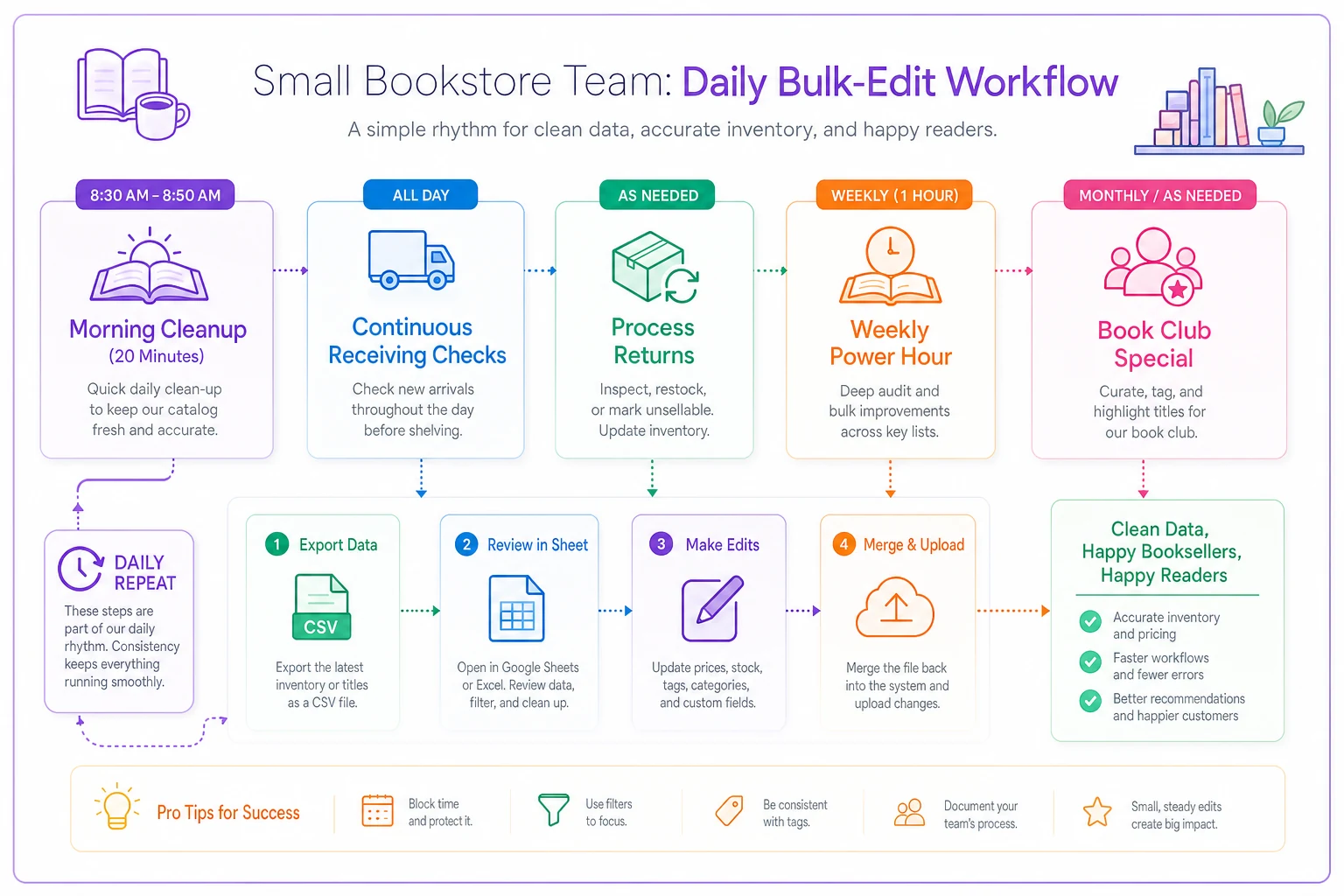
Track progress simply: green-highlight completed sections in your spreadsheet. Mark milestones — when you hit 25% cleanup, 50% cleanup, buy the team lunch. Make it visible.
Validation checks that prevent future chaos
Cleaning your catalog means nothing if duplicates creep back in next month. Build these checks into standard workflows to catch problems before they compound.
Daily duplicate report: Set up a simple automated check each morning. In Google Sheets:
=QUERY(Inventory!A:F,"SELECT title, COUNT(isbn) WHERE date_added = TODAY() GROUP BY title HAVING COUNT(isbn) > 1")
Takes 30 seconds to review and catches most new duplicates immediately.
Receiving verification: Before accepting any distributor shipment into inventory, search for existing editions of those titles. Your receiving checklist should include "Check for duplicate ISBNs" right after "Verify quantities" and before "Update system inventory."
Monthly metrics review: Track duplicate rate as a KPI alongside sales and margins. Calculate it simply: (Number of duplicate entries / Total catalog entries) × 100. Here's a rough reference point for what those numbers mean in practice:
| Duplicate Rate | Status |
|---|---|
| Below 5% | Clean catalog |
| 5%–10% | Manageable, monitor closely |
| 10%–20% | Process breakdown, act soon |
| Above 20% | Immediate attention needed |
Vendor feed auditing: Check how your POS handles distributor catalog updates. Many systems have a "merge similar titles" option buried in settings that nobody ever activates. Turn it on. Set match tolerance to around 90% for titles and 95% for authors. This catches most duplicates automatically without creating false positives.
Staff training integration: Add five minutes of deduplication training to standard onboarding. Show new employees how to search for existing editions before creating new entries. Make it muscle memory, not special knowledge.
When automation makes sense (and when it's overkill)
The question eventually comes up: shouldn't software handle this automatically? The answer really depends on your scale.
For stores under 5,000 active titles, manual cleanup with CSV exports works fine. You can review your entire catalog quarterly, maintain quality control, and catch edge cases that automation would bungle. The time investment — maybe 8–12 hours per quarter — costs less than most automated solutions.
Stores in the 5,000–15,000 title range benefit from a hybrid approach. Use basic automation for detection (the SQL queries and spreadsheet formulas above), but keep merger decisions manual. That balance handles efficiency without sacrificing accuracy.
Above 15,000 titles, or if you're running multiple locations, automation becomes genuinely necessary. But even then, you don't need anything exotic. Simple rule-based deduplication handles around 80% of cases. A bookstore operations platform with built-in catalog management can process thousands of potential duplicates overnight and flag only the tricky cases for human review.
The automation that helps most stores isn't complex matching algorithms — it's workflow automation. Automated daily reports showing new duplicates. Automated warnings when someone tries to create an entry that might duplicate existing stock. Automated quantity rollups when editions get merged. Small automations that prevent buildup without requiring complex infrastructure.
For multi-location stores, centralized catalog management becomes critical. When five stores share inventory data, one duplicate can create five separate problems. That's where investing in proper operational software — something that maintains a single source of truth across locations — pays for itself pretty quickly in prevented errors and saved staff hours.
Maintaining the clean catalog mindset
The hardest part of bookstore metadata cleanup isn't the initial project. It's maintaining discipline afterward. Duplicates feel like minor annoyances until they hit critical mass and suddenly you're drowning again.
Build catalog hygiene into your store's operational rhythm the same way you'd treat counting the till or processing returns. The stores that keep clean catalogs don't treat it as a special project — it's just part of how things run.
Some stores post their duplicate rate on a small whiteboard in the back office, updating it weekly. Others track "Zero Duplicate Days" when no new duplicates were created. One store taped a simple monthly leaderboard near the receiving desk — whoever caught and fixed the most duplicates that month got a small gift card. Nothing elaborate, but it kept catalog quality visible and actually valued by the team.
The compound effect of clean metadata reaches further than most owners expect. Your online presence improves when customers actually find what they're looking for. Staff morale improves when systems work the way they're supposed to. Buying decisions become data-driven instead of gut-feel. Even phone calls get easier — imagine actually knowing your inventory when someone asks about availability.
Catalog cleanliness is operational infrastructure, not administrative overhead. You wouldn't let physical shelves deteriorate until books started falling on customers. Don't let your digital catalog deteriorate until your operations start falling apart.
The path forward is simpler than you think
This doesn't require consultants, complex software, or weeks of dedicated effort. It requires clear detection methods, simple decision rules, and consistent daily habits.
Start tomorrow morning with 25 titles. Use the detection queries above to find your first cluster of duplicates. Apply the canonical edition rules. Merge them using whatever CSV export your system provides. Then do it again the next day.
Within a month, search improves and staff start finding books faster. Within a quarter, your duplicate rate drops below 10%. Within six months, you'll wonder how you ever operated with that mess.
Every small improvement compounds. Each duplicate you eliminate makes the next one easier to spot. Each cleanup session teaches your team to prevent future problems. Each clean section of your catalog makes the messy sections more obvious and easier to prioritize.
Duplicate editions aren't an inevitable cost of selling books. They're a solvable operational problem — and treating them that way is one of the better decisions a bookstore owner can make.
Ready to elevate your bookstore’s operations?
Join 500+ bookstores using Bookstorely to boost sales, optimize stock, and delight book lovers.