

Most independent bookstores collect way more customer data than they realize. There's the POS loyalty file, the email list, the events RSVP spreadsheet, the used-book buyback intake forms with names and addresses, the school-order contacts, the marketplace buyer messages, the abandoned-cart records from your web store, and probably three or four exports sitting in a Downloads folder from the last time you migrated systems.
None of that is a problem until it is. A data governance issue in a bookstore rarely announces itself. It shows up as a deliverability drop when your email starts landing in spam because half your list is stale. It shows up as a customer asking "why do you still have my old address?" It shows up when a marketplace flags your account for messaging inactive buyers, or when your local SEO takes a hit because your Google review requests are going to emails that bounced two years ago.
This is a systems article, not a compliance lecture. The goal is to show how customer data flows through a small bookstore, where it leaks or rots, and how a lightweight governance layer — consent language, retention schedules, purge routines and a quarterly audit — keeps the whole thing clean without hiring a privacy officer you can't afford. If you've already read the 12-month bookstore data governance and analytics roadmap, think of this as the privacy and retention layer that sits underneath it.
Where customer data actually lives in a bookstore
Before you can govern data, you have to know where it is. In most shops nobody has ever written it down. The information is spread across systems that were never designed to talk to each other, which is exactly why it drifts out of sync.
-
POS / loyalty system — names, emails, phone numbers, purchase history
-
Email marketing tool — subscriber list, engagement history, tags
-
Events platform or spreadsheet — RSVPs, ticket buyers, waitlists
-
Web store — accounts, saved addresses, order history, abandoned carts
-
Marketplace channels — buyer names, shipping addresses, messages
-
Used-book intake forms — sellers' names, contact info, sometimes ID details
-
Institutional accounts — school and library contacts, PO details
-
Ad-hoc exports — CSVs from migrations, imports, one-off campaigns
The last category is the one that quietly hurts you. Those loose CSVs — a full customer export you pulled to "check something," a list you sent to a designer for a mailing — sit around unencrypted, get copied into email attachments, and outlive the reason you made them. When you look at how data actually leaks in small retail, it's almost never a dramatic breach. It's a spreadsheet from 2022 with 4,000 email addresses sitting in a shared Google Drive folder that six seasonal hires have had access to.
The pattern worth noticing: every place data lives is also a place data gets stale. A customer moves. An email goes dead. A phone number gets reassigned. If you never delete, you don't just carry privacy risk — you carry rot that degrades everything downstream.
Why stale data quietly wrecks deliverability and local SEO
This is the connection most owners miss. Data governance isn't just a legal chore. Bad data hygiene directly damages two things you actively depend on for revenue: email deliverability and local search.
Deliverability. Mailbox providers like Gmail and Outlook judge your sender reputation partly on bounces and spam complaints. When you keep emailing addresses that went dead — because you never purge inactive contacts — your bounce rate climbs, your engagement rate falls, and providers start routing your newsletters to spam. That means your good customers stop seeing your event announcements too. A list of 5,000 where 1,200 are dead performs worse than a clean list of 3,800.
Local SEO. Review generation runs on customer contact data. If you're sending Google review requests to a list full of bounced emails, your review velocity drops and your requests look spammy to filters. Clean, consented, recent contact data is what lets you ask the right customers for reviews at the right time. This connects directly to the mechanics covered in the local-SEO checklist for bookstores — the review engine only works if the underlying data is alive.
So governance isn't purely defensive. A retention schedule that purges dead contacts is also a deliverability tune-up and a local-SEO booster. That reframing matters, because it turns "boring compliance task" into "thing that makes marketing work better."
Consent language that's actually clear (with examples)
Consent is where small shops either overthink it or ignore it entirely. You don't need lawyer-grade paragraphs. You need language that tells people what you're collecting, what you'll use it for, and gives them a real way out. Vague consent is worse than none, because it creates the illusion of permission while your list slowly fills with people who never actually agreed to marketing.
Here are practical examples you can adapt. Keep them short and put them at the exact point of collection.
Newsletter signup (web or in-store card): > "Join our list for new releases, staff picks and event news. We'll email you a couple times a month. Unsubscribe anytime — we never sell your info."
Loyalty enrollment at POS: > "We'll use your email to track loyalty points and send occasional store updates. You can opt out of marketing emails and keep your points. We keep your purchase history to run the program."
Event RSVP: > "We'll use your email to confirm this event and send reminders. Want ongoing event news too? [ ] Yes, add me to the events list."
That checkbox matters — separating transactional (event reminder) from marketing (ongoing list) is the single most useful consent distinction for a bookstore. It keeps your marketing list clean and defensible.
Used-book intake form: > "We collect your name and contact info to process payment and comply with local secondhand-goods rules. We keep intake records for [X months/years] and don't use this info for marketing unless you opt in below."
A mistake that comes up constantly: the used-book intake form quietly feeds the marketing list. Someone sells you a box of paperbacks and starts getting your newsletter. That's non-consented, it inflates your list with disengaged contacts, and it hurts deliverability. Keep intake data walled off unless the seller checks a box.
A sample retention schedule you can adapt
Retention is deciding, on purpose, how long each type of data lives. Without a schedule, the default is "forever," and forever is where risk and rot accumulate. Here's a starting schedule tuned to a small bookstore. Adjust the periods to your local rules and your accountant's guidance on financial records.
| Data type | Retention period | Trigger to delete/anonymize |
|---|---|---|
| Active marketing subscribers | While engaged + 18 mo inactive | No opens/clicks for 18 months → re-permission or purge |
| Loyalty accounts | While active + 24 mo | No purchase for 24 months → anonymize personal fields |
| Event RSVP (marketing opt-out) | 90 days after event | Event date + 90 days |
| Web store accounts | While active + 24 mo inactive | No login/order for 24 months |
| Order/transaction records | 7 years (tax) | Keep for financial compliance; strip marketing use |
| Used-book intake records | Per local law (often 1–3 yrs) | Statutory period, then purge |
| Abandoned cart data | 30–60 days | Auto-expire |
| Ad-hoc CSV exports | Delete when task done | Max 30 days, no exceptions |
| Former employee access | Immediate on departure | Offboarding day |
Two things worth calling out. First, transaction records and marketing data are different animals. You may need to keep the financial record of a sale for seven years for tax purposes, but that doesn't mean the customer stays on your marketing list. Separate the retention rule from the use rule.
Second, notice the difference between deleting and anonymizing. For a loyalty account you want to close, you often don't need to nuke the historical sales data — you just strip the personal identifiers (name, email, phone) so the aggregate numbers survive for your reporting but the person is no longer identifiable.
CSV purge flows: the part everyone skips
The exports are where governance actually lives or dies. A retention schedule for your POS is easy — the vendor handles storage. The loose CSVs are the wild west, and they're the most likely thing to embarrass you.
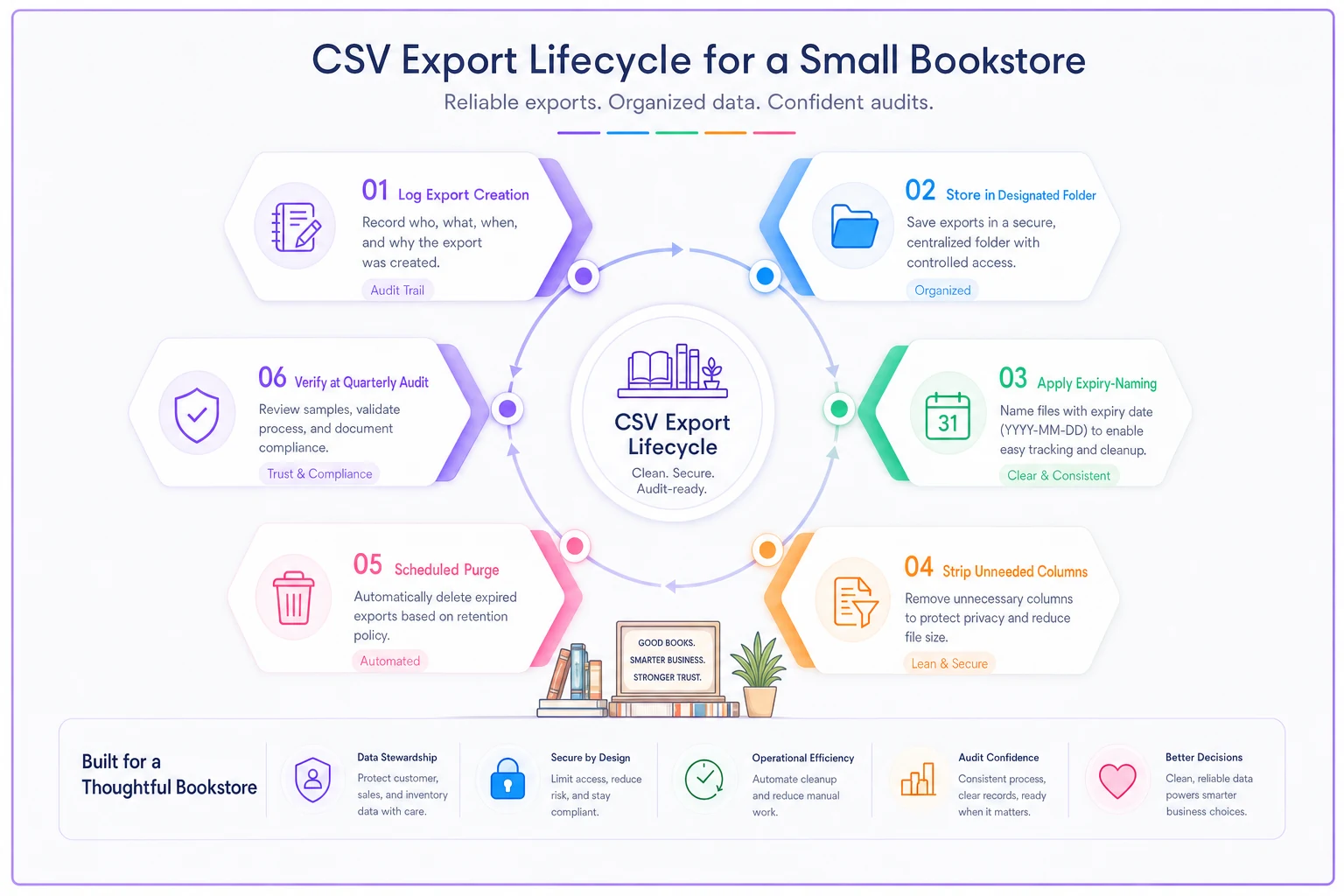
Here's a simple flow for handling exports, from creation to deletion.
-
Log it when you create it. Keep a one-line record
what the file is, why you exported it, who has it, and its delete-by date. A single shared "Export Log" sheet works fine.
-
Store it in one designated folder. Not Downloads, not email attachments, not someone's desktop. One folder, access-controlled.
-
Name it with an expiry. File naming like
2025-06-newsletter-export_DELETE-2025-07.csvmakes the deadline impossible to miss. -
Do the work, then strip what you don't need. If you exported full customer records but only needed emails, delete the other columns before anyone else touches the file.
-
Purge on schedule. When the delete-by date hits, the file is gone — from the folder and from trash.
-
Verify at the quarterly audit. The export log is the first thing you review each quarter (more on that below).
A simple workflow diagram helps everyone see the export lifecycle.
For the actual purge, small teams don't need enterprise tooling. A short script run monthly clears anything past its expiry. Here's a lightweight example you can adapt — it looks for files with a DELETE-YYYY-MM tag in the name and removes anything past date:
#!/bin/bash # purge-expired-exports.sh # Deletes CSVs tagged with DELETE-YYYY-MM once that month has passed. EXPORTDIR="/path/to/customer-exports" TODAY=$(date +%Y-%m) find "$EXPORTDIR" -name "DELETE-.csv" | while read -r file; do tag=$(echo "$file" | grep -oE 'DELETE-[0-9]{4}-[0-9]{2}' | sed 's/DELETE-//') if [[ "$tag" < "$TODAY" ]]; then echo "Purging expired file: $file" rm -f "$file" fi done
And a quick Python version for anonymizing inactive loyalty rows in an export — strips personal fields but keeps the sales columns:
import csv from datetime import datetime, timedelta CUTOFF = datetime.now() - timedelta(days=730) # 24 months PERSONAL = {"name", "email", "phone", "address"} with open("loyaltyexport.csv") as fin, open("loyaltyclean.csv", "w", newline="") as fout: reader = csv.DictReader(fin) writer = csv.DictWriter(fout, fieldnames=reader.fieldnames) writer.writeheader() for row in reader: last = datetime.strptime(row["last_purchase"], "%Y-%m-%d") if last < CUTOFF: for field in PERSONAL: if field in row: row[field] = "REDACTED" writer.writerow(row)
You don't have to be technical to use these — hand them to whoever manages your systems, or run them once a month as part of your close. The point is that purging becomes a routine, not a thing you do in a panic after a scare.
Where operational software with built-in automation earns its keep is exactly here: instead of remembering to run purge scripts manually, a workflow platform can flag inactive contacts, expire old exports, and queue anonymization jobs on a schedule so the retention rules enforce themselves. But the logic above is what any good system should be doing under the hood — worth understanding even if a tool handles it for you.
The quarterly audit: 45 minutes, four times a year
You don't need a formal annual review. You need a short, repeatable check that catches drift before it compounds. Most small-bookstore data problems come from neglect over time, not from a single bad decision — so the fix is a rhythm, not a one-time project.
-
[ ] Review the export log. Every file past its delete-by date is gone. Any file with no logged reason gets deleted.
-
[ ] Check list health. Bounce rate, unsubscribe rate, and % of contacts with zero engagement in 18 months. Flag the dead segment.
-
[ ] Run the inactive purge. Contacts hitting the retention limit get re-permissioned or removed.
-
[ ] Verify access. Anyone who left the team since last quarter no longer has logins to POS, email, drive folders, or marketplace accounts.
-
[ ] Spot-check consent. Pull five recent signups. Can you show where and how each consented? Is transactional separated from marketing?
-
[ ] Confirm intake wall. Used-book seller data hasn't leaked into the marketing list.
-
[ ] Deliverability glance. Are newsletters landing in inbox, not spam? Any provider warnings?
-
[ ] Institutional data check. School/library contacts current, no ex-employees of theirs still on file.
Keep the export log as a single-sheet source of truth so the quarterly audit can be completed in one quick pass.
The access-review line is the one that catches people off guard. Seasonal staffing means logins accumulate. A shop that hires four holiday helpers a year and never removes access is handing standing access to its full customer database to people who left months ago. Offboarding should kill access the same day — but the quarterly audit is your backstop for when it doesn't happen.
When strict governance makes sense — and when you're overdoing it
When this actually matters: If you run an email list over a few thousand, sell across marketplaces, host events, or buy used books from the public, you're carrying enough data that a schedule pays for itself in deliverability alone. If you've migrated POS or email systems in the last two years, you almost certainly have orphaned exports floating around and need the CSV flow sorted out soon.
When you're overdoing it: A brand-new shop with 300 newsletter subscribers and no used-book program doesn't need anonymization scripts and a quarterly audit calendar. Write two clear consent lines, keep one export folder, delete files when you're done, and revisit in a year. Governance should scale with the data you actually hold. Building an elaborate framework for a tiny list is procrastination dressed up as diligence.
Who should NOT try to automate everything at once: If your data is currently a mess across five systems, don't start by writing purge scripts. Start by mapping where data lives and cleaning the worst offender — usually the loose CSVs and the dead email segment. Automation on top of chaos just automates the chaos.
A real scenario
A used-and-new bookstore with two full-time staff had an email list of roughly 6,400 subscribers and a newsletter open rate that had slid under 12%. Event announcements were increasingly landing in spam, and Google review requests weren't converting like they used to.
The audit turned up the usual pattern: around 1,900 contacts hadn't engaged in over two years, several hundred were hard-bouncing, the used-book intake form had been quietly feeding the marketing list for a year, and there were four full customer exports sitting in a shared Drive folder — one of them from a former employee's account that still had active access.
Nothing fancy happened. They walled off the intake form, ran a re-permission campaign, purged the non-responders, deleted the orphaned exports, and killed the ex-employee's access. The list dropped to around 4,100 — smaller, but real. Within a couple of months open rates recovered into the low 20s, event emails started reliably hitting the inbox, and review requests began landing with people who'd actually shopped recently, which nudged their review velocity back up.
The point isn't the exact numbers. A shrinking, well-governed list outperformed a bloated one on every metric that touched revenue — and the cleanup took an afternoon plus a recurring quarterly habit.
Bringing it together
Customer data governance in a bookstore isn't a legal box to tick and forget. It's a connective layer that touches marketing, local search, staffing, and how much you can trust your own numbers. Consent language decides who's legitimately on your list. Retention schedules decide how long data lives before it becomes rot. CSV purge flows contain the loose files that cause most real leaks. And a short quarterly audit keeps all of it from drifting.
The reason bookstore data governance feels overwhelming is that owners imagine it as one enormous project. It isn't. It's a small set of rules, written down once, enforced on a rhythm, and increasingly handled by whatever operational system runs your day-to-day. Get the schedule and the audit in place, keep the exports on a leash, and the whole thing quietly does its job — protecting customers and, not incidentally, making your marketing work better than it did when your list was twice the size and half of it was dead.
Customer data governance in a bookstore isn't a legal box to tick and forget. It's a connective layer that touches marketing, local search, staffing, and how much you can trust your own numbers. Consent language decides who's legitimately on your list. Retention schedules decide how long data lives before it becomes rot. CSV purge flows contain the loose files that cause most real leaks. And a short quarterly audit keeps all of it from drifting.
The reason bookstore data governance feels overwhelming is that owners imagine it as one enormous project. It isn't. It's a small set of rules, written down once, enforced on a rhythm, and increasingly handled by whatever operational system runs your day-to-day. Get the schedule and the audit in place, keep the exports on a leash, and the whole thing quietly does its job — protecting customers and, not incidentally, making your marketing work better than it did when your list was twice the size and half of it was dead.