


Most bookstore owners assume PCI compliance is either someone else's problem (the payment processor handles it, right?) or a bureaucratic monster they'll deal with someday. Both assumptions get people into trouble — not usually with a massive breach, but with slow, grinding losses: a skimmed card number that turns into a chargeback storm, a refund workflow so loose that a part-timer quietly pockets $40 at a time, a lost laptop with a spreadsheet of customer emails and partial card data that nobody realized existed.
For a shop running on one or two POS terminals, a website, and maybe a marketplace account, full enterprise security theater is overkill. But no structure is worse. What small bookstores actually need is a tight, minimal control set — the handful of rules that prevent 90% of the real-world damage — plus a plan for what to do in the first 30 minutes when something looks wrong.
This is that playbook. Not a compliance certification walkthrough. An operational one: how the pieces connect, where they break as you add staff and channels, and the actual scripts and logs you can put in place this week.
The real risk picture for a shop your size
Be honest about the threat model, because that's where most generic security advice falls apart. A 1–4 person bookstore is almost never targeted by a sophisticated external attacker. The losses come from a much more boring set of sources:
-
Opportunistic internal fraud — refunds to a personal card, "no sale" drawer opens, voided transactions that were actually real sales pocketed as cash.
-
Card data living where it shouldn't — handwritten card numbers for phone orders on a sticky note, full PANs typed into order notes, a shared email inbox full of customer card details from special orders.
-
Account takeover on the soft edges — your marketplace seller account, your email, your POS admin login, all protected by one reused password.
-
Honest mistakes that look like fraud later — a refund processed to the wrong order, a till that's $60 short with no paper trail, so you can't tell if it's theft or a miscount.
The thread connecting all of these is the same: no segregation and no logging. When one person can take the sale, void it, refund it, open the drawer, and close the day's totals with nobody else ever seeing the numbers, you don't have a security problem yet — you have the conditions for one. The whole point of a PCI‑lite approach is to introduce just enough friction and visibility that bad actions leave a trace.
Reduce your scope first — it's the highest-leverage move
Before you build a single control, shrink the surface area. Every place card data touches your business is a place you have to protect, log, and worry about. The goal is to touch as little of it as possible.
The core principle most small shops miss: if you never store, write down, or email a full card number, you've eliminated the majority of your risk for free. Modern card readers and payment gateways handle the sensitive data so you don't have to. Your job is to make sure your people and processes don't accidentally create card data where the hardware intended there to be none.
A quick scope audit looks like this:
| Where card data might live | What should actually happen | Common failure |
|---|---|---|
| In-person sales | Card dips/taps the reader; you never see the full number | Staff key in numbers manually "because the chip failed" and write them down |
| Phone / special orders | Enter directly into a secure payment form while the customer is on the line | Number written on an order slip and left in a drawer for hours |
| Website orders | Hosted checkout; data never hits your server | A plugin or spreadsheet export quietly capturing full PANs |
| Refunds | Processed through the gateway against the original transaction | Refund keyed to a different card than the original purchase |
| Customer records | Name, email, order history only | Someone pasted card details into the order notes field |
If you find card numbers in email or notes, remove them and train staff on the proper tokenization/checkout flow immediately.
If you walk your shop with this table and find card numbers anywhere in the "common failure" column, fix those before anything else. Nothing you build on top matters if full card numbers are floating around on paper or in a shared inbox.
Till segregation for tiny teams (yes, even solo)
"Segregation of duties" sounds like it requires a staff of twenty. It doesn't. For a 1–4 person shop, segregation is really about separating the ability to move money from the ability to erase the evidence. Here's how it scales.
Solo operator. You can't segregate duties from yourself, so you segregate across time and records instead. Every refund, void, and no-sale gets logged in a simple running sheet with a reason. You reconcile the drawer against the POS report daily, not weekly. The log isn't there to catch you — it's there so that when you look at the month, you can actually explain a $45 discrepancy instead of shrugging. It also matters the day you hire someone, because now you have a baseline of what "normal" looks like.
Two people. The owner holds the admin credentials; the employee gets a cashier login only. The employee can take sales and process refunds up to a threshold (say $25) without approval. Anything above that needs the manager code. Crucially, the person who counts the drawer at close shouldn't be the only person who ever sees the POS totals. Even if that means you snap a photo of the end-of-day report and text it to yourself, you've created a second set of eyes.
Three to four people. Now you can assign real roles. One person handles the daily reconciliation; a different person runs it or spot-checks it a couple of days a week. Cashier logins are individual — never shared — so every transaction ties to a person. The shared "front desk" login that everyone uses is the single most common control failure in small retail, because it makes every log entry useless. You can't triage an incident when the answer to "who did this?" is "could've been anyone."
The non-negotiable across all sizes: individual logins and a manager approval threshold for refunds and voids. Everything else is a refinement.
Tokenization in plain operational terms
You don't need to understand cryptography to use tokenization correctly — you need to understand what it buys you operationally. When your processor tokenizes a card, it swaps the real number for a stand-in token that's useless to anyone who steals it. The practical payoffs for a bookstore:
-
Repeat customers and subscriptions work without you storing cards. The subscription box customer's card lives as a token at the gateway; you just reference the token.
-
Refunds against the original sale become clean, because the token ties the refund to the exact transaction — which is also a fraud control, since it's much harder to refund to a card that wasn't used for the purchase.
-
Special orders can be charged later (when the book arrives) without a card number sitting in a drawer for three weeks. You authorize or save a token at order time, capture at fulfillment.
The operational rule that flows from this: any time a staff member feels the need to write down or save a card number "so we can charge it later," that's a signal the tokenization flow isn't set up right. The fix is a process fix, not a willpower fix. If people are writing numbers down, it's because the correct path is slower or missing — find it and close it.
Refund approval workflow
Refunds are where small-shop fraud and small-shop errors both concentrate, and they're hard to tell apart after the fact. A good refund workflow does two things: it slows down the ones worth slowing down, and it leaves a trail on all of them.
-
Threshold check. Refunds under your set limit (commonly $20–$25) a cashier can process solo. Over that, a manager code or second person is required. This single step kills the "small, repeated, self-approved refund" pattern that's the hallmark of internal skimming.
-
Match to original transaction. The refund must reference the original sale ID. Refunds should go back to the original card, period. "Refund to a different card" or "refund as cash for a card purchase" should be a hard stop requiring manager approval and a written reason.
-
Reason required. Every refund gets a short reason code
damaged, customer changed mind, duplicate charge, special order canceled, wrong item. Reasons turn a meaningless list of refunds into a pattern you can actually read.
-
Daily refund review. At close, whoever reconciles glances at the day's refunds. Not an audit — just a 30-second "does anything look weird?" The point is that refunds are seen by someone other than the person who issued them, every single day.
-
Weekly pattern check. Once a week, scan refunds by employee and reason. One cashier with triple the refund rate of everyone else isn't automatically guilty — but it's a conversation worth having.
The deeper your logging on refunds, the more your reconciliation does double duty. If you've already built a tight close process — and if you haven't, the close‑the‑month‑in‑a‑day playbook covers how a 1–3 person team can do it in hours — the refund log folds right into that routine instead of becoming a separate chore.
Lightweight logging templates
Logs are where good intentions die, because people imagine logging means enterprise software and audit trails. For a bookstore it means a few simple sheets that someone actually fills in. The test of a good log template: can a part-timer complete it in under 15 seconds, and does it capture enough to reconstruct what happened?
| DATE | TIME | TYPE | AMOUNT | ORDER # | CASHIER | REASON | APPROVED BY |
|---|---|---|---|---|---|---|---|
| 10/14 | 11:20 | Refund | $18.00 | 10442 | JL | damaged cover | (under limit) |
| 10/14 | 14:05 | Refund | $52.00 | 10459 | JL | special order canc. | MR |
| 10/14 | 16:40 | Void | $0.00 | 10471 | SK | keyed wrong qty | (self) |
| 10/14 | 17:15 | NoSale | -- | -- | SK | made change for cust | -- |
DATE: 10/14 OPENING FLOAT: $150.00 CASH SALES (POS report): $412.00 EXPECTED DRAWER: $562.00 COUNTED DRAWER: $555.00 VARIANCE: -$7.00 REFUNDS TODAY: 2 ($70.00) VOIDS/NO-SALES: 2 NOTES: variance likely change error ~4pm, busy. No action. CLOSED BY: SK REVIEWED BY: MR (photo sent)
Notice what these do. A single day's sheet is unremarkable. But across a month, the variance column tells a story — random small swings in both directions is normal; a consistent one-direction drift tied to one person's shifts is a flag. This is the same logic behind a disciplined daily cycle‑count routine: small, boring, daily records are what make the occasional real problem visible instead of invisible.
Keep logs for at least 12 months. They cost you nothing and they're the difference between "we think" and "we know" when something goes sideways.
The rapid incident triage script
When something looks wrong — a customer reports a fraudulent charge they trace to your shop, you spot a cluster of odd refunds, a staff laptop goes missing, or your marketplace account gets locked for "suspicious activity" — the first 30 minutes matter more than anything. Panic and guessing cause almost as much damage as the incident itself. Here's a triage script small enough to tape inside the register.
Step 1 — Contain (first 5 minutes). Stop the bleeding without destroying evidence.
-
Suspected compromised POS or reader? Stop taking cards on it and switch to a backup or mobile reader.
-
Suspected account takeover (email, marketplace, POS admin)? Change that password immediately and enable two-factor if it wasn't on.
-
Lost device? Note exactly when and where it was last seen; if it has remote-wipe, trigger it only after noting what was on it.
Step 2 — Classify (next 10 minutes). Figure out what kind of incident this is, because the response differs.
| Signal | Likely category | First call |
|---|---|---|
| Customer reports fraud after shopping with you | Possible data exposure / coincidence | Payment processor |
| Cluster of small refunds, one cashier | Internal fraud | Pull logs, don't confront yet |
| Marketplace/account locked | Account takeover | Platform support + reset creds |
| Missing laptop/phone with customer data | Device + data exposure | Assess what data was on it |
| Drawer short repeatedly on one shift | Error vs. theft | Reconcile against logs |
Step 3 — Preserve (next 10 minutes). Write down what you know now, before memory fades. Date, time, who noticed, what they saw, what you touched. Pull the relevant logs — refund sheet, till sheets, POS transaction export for the window in question. Do not delete anything. Do not "test" by re-running a transaction. If it's a real card data exposure, your payment processor has a defined breach process and they'll tell you next steps; your job is to have preserved the facts so they can work from them.
Step 4 — Decide escalation (final 5 minutes). Does this need your processor, the marketplace, the bank, or law enforcement? Internal fraud usually means pulling logs quietly and talking to the person after you understand the pattern — never confront on a hunch with no records. Data exposure means the processor leads. Account takeover means the platform and resetting every credential that reused that password.
The reason this works for a tiny team is that it replaces adrenaline with a checklist. You're not deciding in the moment whether to panic — you're reading steps off a card.
When this makes sense — and when you're overdoing it
This full set makes sense when you have any employees besides yourself, you process phone or special orders, you sell across more than one channel, or you've ever had a discrepancy you couldn't explain. The moment a second person can touch the drawer, segregation and logging stop being optional.
You're probably overdoing it if you're a true solo operator with a single card reader, no stored data, and you're building elaborate approval chains for yourself. In that case, your energy goes into scope reduction (never storing card data) and daily reconciliation, not multi-level approvals that only involve one person.
Who should NOT skip this: anyone taking card numbers over the phone, anyone with a shared "front desk" login, and anyone who handles special orders where cards get charged days or weeks after they're captured. Those are the three setups where small shops quietly accumulate real exposure.
A real scenario
A used-and-new bookstore running two registers with an owner and two part-timers noticed their monthly drawer variances had crept from the usual few dollars either way to a steady $40–$70 short, almost always on the same shift. Nothing dramatic, nothing obvious — just a drift.
They had no refund log and a shared cashier login, so for two months they genuinely couldn't tell whether it was theft, miscounts, or a flaky POS. The fix wasn't a security system. It was three changes: individual logins for each person, a refund sheet with reason codes, and a daily photo of the end-of-day report sent to the owner. Within a few weeks the pattern resolved itself — the shortfalls stopped once transactions tied to individuals and refunds required a reason. Whether it had been deliberate or sloppy almost didn't matter; the visibility itself changed the behavior. Variances settled back to the normal few-dollar range, and more importantly, the owner could now answer "what happened?" with records instead of a guess.
That's the whole thesis here. You're not trying to build a fortress. You're trying to make sure that money can't move, and data can't leak, without leaving a trace someone will see within 24 hours.
Pulling it together
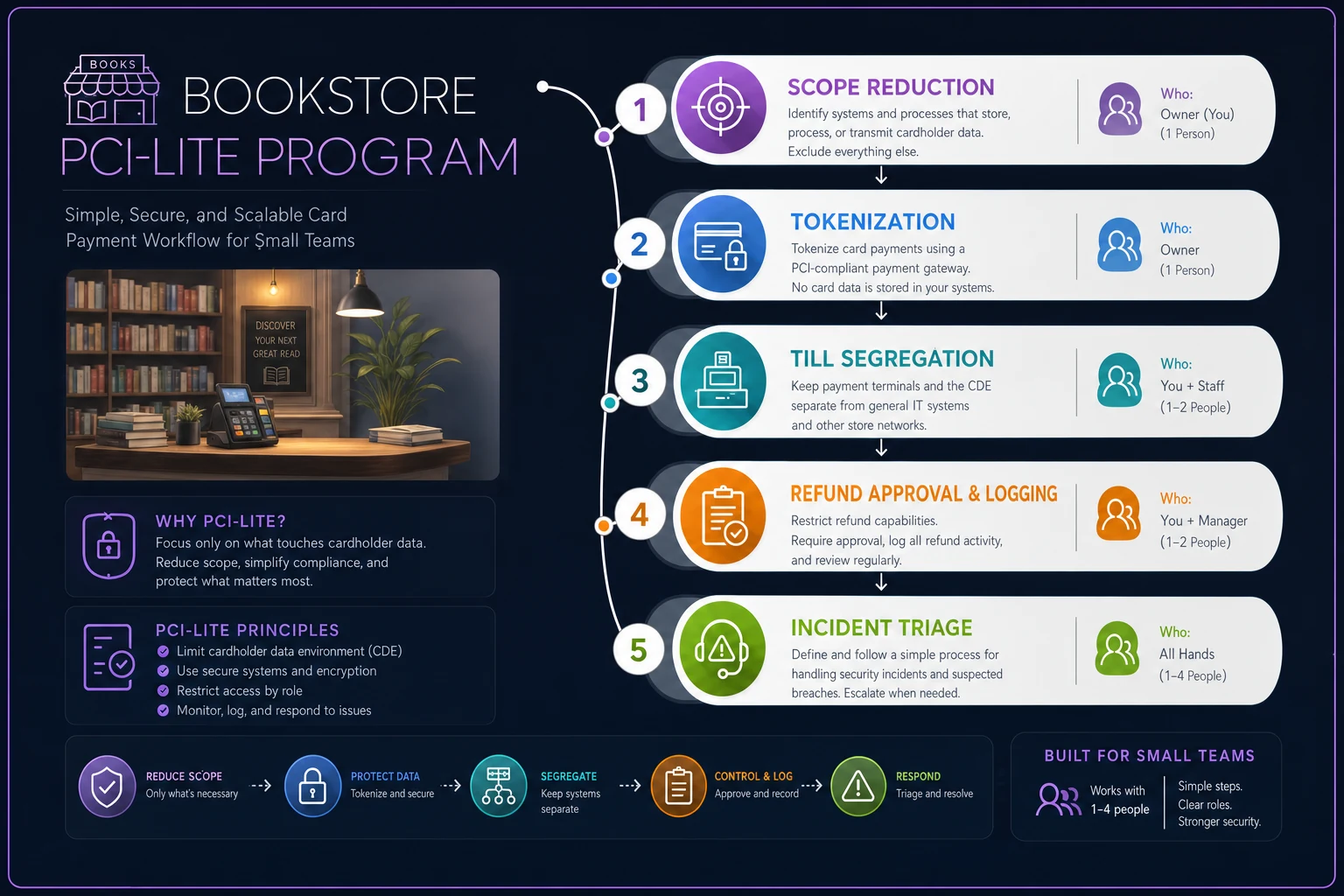
A workable bookstore PCI security playbook for a 1–4 person team comes down to a short, connected chain: shrink your scope so card data lives almost nowhere, let tokenization carry the risk the hardware was built to carry, segregate the power to move money from the power to erase the record, require approval and a reason on refunds, log the handful of things that matter in sheets people will actually fill out, and keep a triage script ready for the first half hour of a bad day.
None of these pieces is impressive on its own. The segregation is loose by enterprise standards, the logs are clipboards, the triage script fits on an index card. But together they close the gaps where real small-shop losses happen — and they scale cleanly as you add staff and channels. Start with scope reduction this week, add the refund log and individual logins next, and fold the daily review into the close routine you're hopefully already running. The goal isn't perfect security. It's making sure that when something goes wrong, you see it fast and you can prove what happened.
A simple workflow ties the pieces together:
Start with scope reduction this week, add the refund log and individual logins next, and fold the daily review into the close routine you're hopefully already running. The goal isn't perfect security. It's making sure that when something goes wrong, you see it fast and you can prove what happened.
None of these pieces is impressive on its own. The segregation is loose by enterprise standards, the logs are clipboards, the triage script fits on an index card. But together they close the gaps where real small-shop losses happen — and they scale cleanly as you add staff and channels. Start with scope reduction this week, add the refund log and individual logins next, and fold the daily review into the close routine you're hopefully already running. The goal isn't perfect security. It's making sure that when something goes wrong, you see it fast and you can prove what happened.
Start with scope reduction this week, add the refund log and individual logins next, and fold the daily review into the close routine you're hopefully already running. The goal isn't perfect security. It's making sure that when something goes wrong, you see it fast and you can prove what happened.