



If you already have a monthly cycle-count program written down somewhere, you know the gap isn't the policy. The policy is fine. The problem is nobody has figured out exactly what to count tomorrow morning, in what order, with what form in hand, before the first customer walks in and the whole plan falls apart.
This is the execution layer. No philosophy about why shrink matters, no spreadsheet theory. Just the math for how many SKUs you touch per day, the exact picklist rules, a 20-minute script you can read off a laminated card, and the forms you fill in. Pick your store size, copy the numbers, and run it.
First: how many SKUs do you actually count each day?
The whole thing falls apart if you pick an unrealistic daily number. Twenty minutes is roughly enough to carefully count, verify, and record 12 to 18 SKUs in a bookstore where most items live on open shelves and some need a backroom check. Call it 15 on a normal day, fewer if you're doing a recount.
The point of ABC classing is that you don't count everything equally. Fast movers and expensive items earn more frequent attention. A working split most indie shops land on:
-
A SKUs (~10% of catalog)
high velocity or high value. Count every ~20 working days.
-
B SKUs (~20% of catalog)
moderate. Count every ~60 working days.
-
C SKUs (~70% of catalog)
slow tail. Count every ~120 working days.
Worked example — 1,200 SKU store
-
A = 120 SKUs, cycle every 20 days → 120 ÷ 20 = 6 A SKUs/day
-
B = 240 SKUs, cycle every 60 days → 240 ÷ 60 = 4 B SKUs/day
-
C = 840 SKUs, cycle every 120 days → 840 ÷ 120 = 7 C SKUs/day
Total: 17 SKUs/day. That's slightly rich for 20 minutes. Drop the C cadence to every 140 days (6/day) and you're at 16, comfortably inside the window on most days.
Worked example — 1,800 SKU store
-
A = 180 SKUs, every 20 days → 9/day
-
B = 360 SKUs, every 60 days → 6/day
-
C = 1,260 SKUs, every 120 days → 10.5/day → 11/day
Total: 26 SKUs/day. Not happening in 20 minutes with one person.
For 1,800 SKUs you have two honest options:
-
Stretch the cycles. A every 30 days (6/day), B every 90 days (4/day), C every 180 days (7/day) → 17/day. Workable.
-
Run two short blocks — 20 minutes at open, 20 at close — and keep tighter cycles.
Most single-staff 1,800-SKU shops go with option 1 and accept that an A item gets counted roughly monthly instead of every three weeks. That's still dramatically better than the once-a-year full count that let shrink hide for eleven months.
| Store size | A/day | B/day | C/day | Total/day | Fits 20 min? |
|---|---|---|---|---|---|
| 1,200 SKU (tuned) | 6 | 4 | 6 | 16 | Yes |
| 1,800 SKU (relaxed cycles) | 6 | 4 | 7 | 17 | Yes, barely |
| 1,800 SKU (tight cycles) | 9 | 6 | 11 | 26 | No — split into two blocks |
One pattern worth naming: the C tail is where people cheat first. When mornings get busy, owners skip the slow movers "because they never move." That's exactly where quiet shrink and phantom inventory pile up, because nobody's looking. If you're going to cut somewhere, cut A frequency before you cut C coverage.
The picklist rules that stop you from counting the same shelf forever
A daily list that's just "pick 16 at random" fails two ways: it keeps landing on the same comfortable shelves, and it ignores items that are overdue. Use these rules, in order:
-
Oldest-overdue A first. Any A SKU past its due date goes to the top, oldest first. These are your money items — never let them drift.
-
Then B/C by seeded random. For the remaining slots, pull B and C with a seeded random selection — meaning the "random" is reproducible from a date seed, so two different mornings don't accidentally produce the same list, and you can prove later which SKUs were eligible on a given day.
-
Anti-repeat shelf logic. No single shelf or bay should supply more than 2–3 SKUs on the same day. Without this, random selection clusters — you end up counting one bay heavily and leaving the next one untouched for months.
-
Backfill rule. If anti-repeat logic blocks a pick, draw the next eligible SKU from a different bay rather than skipping the slot.
A simple way to run this without special software: keep a master sheet with columns for SKU, class, last-counted date, and shelf/bay code. Sort by class and date, apply the overdue rule, then use a spreadsheet RAND() reseeded each morning for the B/C fill, filtering out bays already at their daily cap.
The mistake people make is treating the picklist as something to generate "whenever." Generate it the night before or first thing, before you've touched anything. A picklist built after you've already walked the floor is built around what you happened to notice — which is the opposite of an unbiased sample.
The minute‑by‑minute 20‑minute audit script
Laminate this. Read it in order. The timing matters because the failure mode isn't counting wrong — it's running long and abandoning the back half of your list.
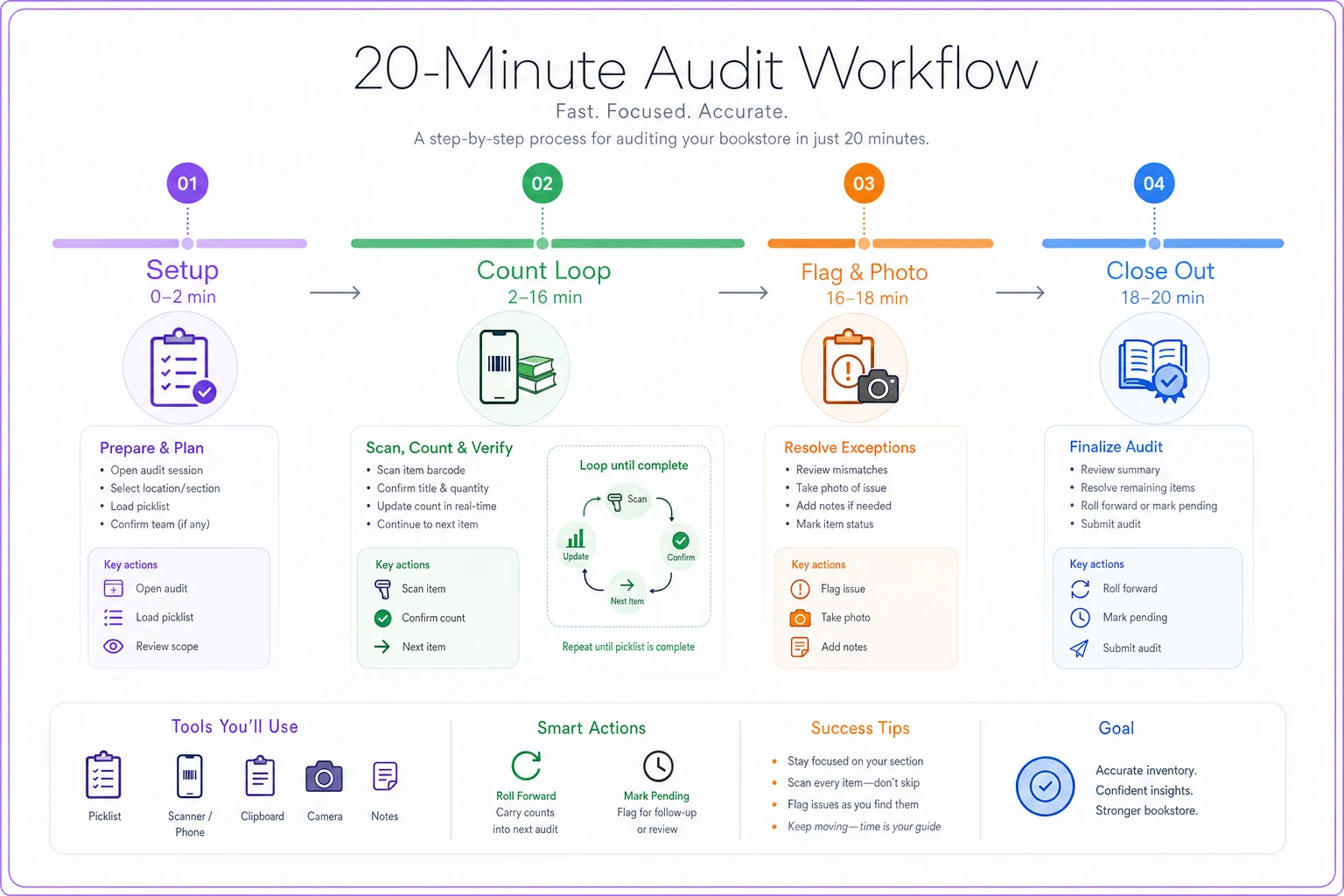
Use this as a quick visual reference for the 20-minute sequence.
Minutes 0–2: Setup
-
Pull today's picklist (printed or on device).
-
Note start time. Grab scanner/phone, count sheet, pen, phone for photos.
Minutes 2–16: Count loop (roughly 50 seconds per SKU for 16 items)
For each SKU, capture these exact fields:
-
SKU / ISBN
-
Title (short)
-
Shelf/bay code
-
System on-hand (read before counting — write it down first)
-
Physical count (count twice if under 10 units)
-
Variance (physical − system)
-
Condition flag (new / shelf-worn / damaged)
-
Notes (misshelved, found in two locations, etc.)
Minutes 16–18: Flag and photo
-
Any variance over threshold → photo the shelf facing and the item.
-
Mark the SKU as "pending adjustment," not adjusted. You do not touch the system mid-count.
Minutes 18–20: Close out
-
Record end time.
-
Transfer the count sheet to your log (or confirm the digital entries saved).
-
Carry any un-counted SKU to tomorrow's list, tagged "rolled."
Inline checklist (tape to the clipboard)
-
[ ] Picklist in hand before touching shelves
-
[ ] Wrote system on-hand before physically counting
-
[ ] Counted twice on small quantities
-
[ ] Logged condition on every item, not just damaged ones
-
[ ] Photographed every over-threshold variance
-
[ ] Nothing adjusted in POS during the count
-
[ ] Rolled uncounted SKUs forward
-
[ ] Start and end time recorded
The "write system on-hand before counting" line looks pedantic. It isn't. The most common way a count gets contaminated is the counter glancing at the system number, seeing "7," counting until they hit 7, and stopping — missing the eighth copy wedged behind the display. Record the expected number, then count blind to it.
Variance thresholds and the escalation matrix
Not every discrepancy deserves the same response. One unit off on a $4 bargain paperback is noise. One unit off on a $60 art book is real money.
| Variance size | Trigger | Action |
|---|---|---|
| 0 units | — | Mark counted, update date, done |
| 1 unit and under $25 | Minor | Recount once on the spot; if confirmed, adjust and note |
| 1 unit and $25+ | Value flag | Photo, recount, hold for independent recount next day |
| 2–3 units, any value | Pattern flag | Photo, recount, check receiving/returns log for that SKU |
| 4+ units or $75+ total | Escalation | Freeze adjustment, full independent recount, investigate |
Two thresholds run in parallel — a unit threshold and a dollar threshold — and the stricter one wins. A $9 title off by five units escalates on units. A $90 title off by one escalates on dollars.
The investigation step for the escalation row isn't vague "look into it." It's a specific sequence: check the last 30 days of sales for that SKU, check the returns log, check whether it shares a shelf with a near-identical edition (the classic duplicate-ISBN mixup), and check whether a consignment or trade-in intake touched it recently.
Independent recount — adapted for a one-person shop
The textbook rule is "a second person recounts." You don't have a second person. So you rebuild independence through time and blindness instead:
-
The flagged SKU gets re-counted on a different day, without looking at either the original physical count or the system number.
-
Pull a fresh blank line
SKU, shelf code, blank count field. No prior numbers visible.
-
Count. Then compare all three
system, original physical, blind recount.
-
If the two physical counts agree and both differ from system → real variance, adjust.
-
If the two physical counts disagree → you have a counting problem, not an inventory problem. Count a third time, slowly.
The day-gap is what manufactures independence. Counting the same shelf twice in five minutes just reproduces your first mistake. Counting it tomorrow, cold, catches the misshelved copy you walked past yesterday.
Counting during open hours: the frozen‑snapshot method
Counting while the register is live is how you create variances instead of finding them. A customer buys the exact title you're mid-count on, and suddenly your "physical" and "system" numbers are describing two different moments.
-
At the moment you start a SKU, record the system on-hand as of that timestamp. That's your frozen number.
-
Count the physical units.
-
If a sale of that exact SKU happens between your snapshot and your count, void that SKU from today's list and roll it forward. Don't try to do mental math on a live sale.
-
Keep your count window to low-traffic times — typically the first 20 minutes after open before foot traffic builds.
For a single-staff store, the practical version is simpler: count before you unlock the door. The snapshot method is your backup for the days you can't, or when you're counting a backroom overstock location customers can't reach anyway.
The exception form — exact fields
When something doesn't reconcile cleanly, it needs a paper (or digital) trail. Keep the form short enough to fill in under 90 seconds:
-
Date and time
-
Counter initials
-
SKU / ISBN
-
Title
-
Shelf/bay code
-
System on-hand (frozen)
-
Physical count (original)
-
Blind recount (if done)
-
Final agreed count
-
Variance (units)
-
Variance ($)
-
Suspected cause (sale lag / misshelf / damage / receiving error / theft / consignment / trade-in / unknown)
-
Photo reference (file name or ID)
-
Adjustment made? (Y/N) and by whom
-
Authorization initials (if required)
The "suspected cause" field is the one that pays off over months. When you tally causes at month-end and 40% say "misshelf," you don't have a shrink problem — you have a shelving discipline problem, and the fix costs nothing.
Logs to keep and how long to keep them
Three artifacts, three retention windows:
| Artifact | What it is | Retention |
|---|---|---|
| Daily count sheets | The raw counts and times | 12 months |
| Variance photos | Shelf facings + items over threshold | 12 months (longer if tied to an insurance or theft claim) |
| Exception forms | Every escalated discrepancy | 24 months |
| Adjustment exports | POS adjustment log pulls | Keep with monthly close, 7 years alongside financials |
| Monthly shrink reports | The rollup below | 36 months for trend analysis |
Name photo files with a consistent pattern — YYYYMMDDSKUshelf — so the exception form's "photo reference" field actually points to something findable six months later. An uncomfortable number of stores take diligent photos and then can never locate them.
Monthly shrink report — copyable template with formulas
One row per counted SKU for the month, then a summary block. Column structure and formulas (spreadsheet-style):
| Column | Formula / Source |
|---|---|
| SKU | entry |
| Class (A/B/C) | lookup from master |
| Times counted this month | count |
| Total units variance | sum of (physical − system) |
| Unit cost | lookup |
| $ variance | units variance × unit cost |
| Suspected cause | from exception form |
Summary block formulas:
-
Total $ shrink =
SUM($ variance column) -
Shrink as % of inventory value =
Total $ shrink ÷ average inventory value at cost -
Count accuracy rate =
SKUs with zero variance ÷ SKUs counted -
Escalations this month =
COUNT of exception forms
Example row
| SKU | Class | Counts | Unit var | Unit cost | $ var | Cause |
|---|---|---|---|---|---|---|
| 9780-xxxx | A | 2 | −3 | $8.40 | −$25.20 | misshelf (found 2 next bay) |
That row tells a story the raw number hides: it looked like 3 units of shrink, but two turned up one bay over. Real shrink was 1 unit / $8.40. If you'd adjusted on the first count without the recount discipline, you'd have overstated shrink by $16.80 on a single SKU — and understated your actual count accuracy.
POS / inventory integration best practices
A few rules that keep the daily count from fighting your system:
-
Adjust in one place only. Make POS the system of record and never adjust directly in a marketplace or secondary tool. Let sync flow outward.
-
Timestamp your exports. When you pull system on-hand, know exactly when the snapshot was taken. A number pulled "sometime this morning" is useless for variance math.
-
Batch adjustments at a set time, not scattered through the day, so your exports are clean and your audit trail has clear before/after states.
-
Reconcile the adjustment log weekly against your exception forms. Every system adjustment should trace back to a form. An adjustment with no form behind it is the thing to investigate.
If your inventory tool can generate the seeded, anti-repeat picklist and timestamp the on-hand snapshot automatically, that removes the two most error-prone manual steps — but the discipline above works on a spreadsheet and a clipboard if that's what you've got.
Authorization matrix for adjustments
Even in a one-person shop, tiered authorization matters because it forces a pause on the big ones.
| Adjustment size | Who can approve |
|---|---|
| Under $25 / 1–2 units | Counter self-approves, logs it |
| $25–$75 | Self-approve only after blind recount confirms |
| Over $75 or 4+ units | Hold overnight; owner reviews exception form before adjusting |
| Consignment/trade-in items | Always owner review (ownership and credit implications) |
When the counter and the owner are the same person, the "overnight hold" is your control. It stops you from making a $90 adjustment on a tired Tuesday morning that a fresh look would have caught as a shelving error.
Catalog‑hygiene checklist before you launch
Run the daily program on a messy catalog and you'll generate false variances all month.
-
[ ] No duplicate ISBNs or duplicate records for the same edition
-
[ ] Every SKU has a shelf/bay code assigned
-
[ ] Every SKU has an ABC class
-
[ ] Unit cost populated for every active SKU
-
[ ] Consignment and trade-in items flagged as such
-
[ ] Zero-on-hand phantom SKUs archived or resolved
-
[ ] Non-book items (cards, gifts) classed separately so they don't skew book cadence
Clean these first:
KPIs and exactly how to compute them
Four numbers, computed the same way every month:
-
Count accuracy rate = SKUs with zero variance ÷ SKUs counted. Target 95%+.
-
Shrink rate = total $ shrink ÷ average inventory value at cost. Most indie shops run 1–2%; above 3% needs investigation.
-
Coverage = unique SKUs counted this month ÷ planned SKUs for the month. If coverage dips below ~90%, your daily window is too tight or mornings are too chaotic.
-
Escalation rate = exception forms ÷ SKUs counted. A rising escalation rate usually points to a process break upstream — receiving, returns — rather than more theft.
Track the trend, not the single month. A one-month accuracy dip during the holiday rush is normal. Three months of decline is the system telling you something.
A realistic before/after
A used-and-new indie shop running around 1,500 SKUs had been doing one full count a year. Every January they'd find a shrink number somewhere in the $5k–$6k range with no idea where it came from — eleven months of blur.
They switched to the daily 20-minute block: roughly 16 SKUs a day, A items monthly, frozen-snapshot method before open. Within the first two months, the exception-form cause tallies showed something they never expected — well over half their apparent shrink was misshelving and duplicate-edition mixups, not theft. Real shrink was closer to $2k–$3k annualized. They tightened shelving discipline on two problem bays, and count accuracy climbed into the mid-90s by month four.
The money saved was real, but the bigger win was knowing which problem they actually had.
FAQ — bookstore‑specific edge cases
How do I count used trade-ins that haven't been priced yet? Keep an intake holding location that's a separate SKU class, excluded from the main picklist until graded and cataloged. Counting ungraded trade-ins against the main system just manufactures variance.
Consignment copies — do they count as my inventory? Count them physically, but flag them clearly and keep their variance in a separate line. A missing consignment copy is a credit and ownership issue with the consignor, not a shrink number against your own cost of goods. Always route these to owner review.
What about donations? Treat donated stock like trade-ins — holding location, separate class, no inclusion in the daily cadence until it's graded, priced, and shelved. Then it joins the normal rotation.
A title exists as both a new and a used copy — how do I avoid mixing them? They must be separate SKUs with separate shelf codes. If they share a record, every count will look wrong. That's a catalog-hygiene fix, not a counting fix.
The whole point of breaking the monthly program down to this level is that one person, before unlocking the door, can run it from memory within a week. No decisions to make in the moment, no policy to reread — just the picklist, the script, the thresholds, and the forms.
Count 16 things, write down what you find, roll what you miss. Do it for a month and the shrink number stops being a January mystery and starts being a problem you can actually name.